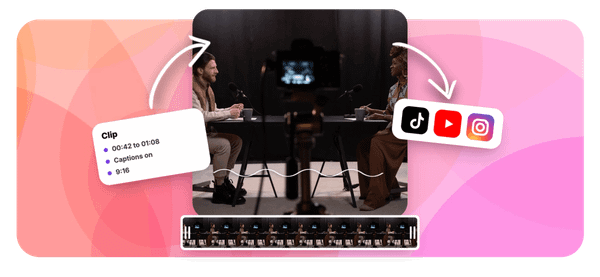
If you've ever spent hours rewatching long recordings just to pull out one good clip, you already know how much time manual video editing eats up. The good news is that automating your video clipping workflow is now within reach, and with the rise of top AI podcast clip generator tools, you can cut that process significantly. This article walks you through automating video clipping in 30 minutes or less, so you can spend more time creating and less time editing.
That's where Crayo's clip creator tool comes in. It handles the heavy lifting of automated clip extraction, short-form video creation, and content repurposing, all without requiring you to be a video editing expert. Whether you're working with podcast recordings, long-form interviews, or livestream footage, Crayo helps you identify the most shareable moments fast and turn them into ready-to-post clips with minimal manual effort.
Table of Contents
- Why Creators Struggle to Automate Video Clipping
- The Hidden Cost of Automating Without a Check
- How to Automate Video Clipping in 30 Minutes
- The 30-Minute Workflow to Build Your First Clipping Automation
- Automate Video Clipping Faster With Crayo
Summary
- Automating video clipping involves more moving parts than most creators anticipate. The trigger, the clipping step, the wait, the edit, the approval, and the publish are six distinct stages, and most creators plan for only two. Connecting two tools isn't the same as building a working pipeline, and the gap between the two is where most automation attempts quietly fail.
- The wait step is one of the most commonly overlooked parts of any clipping workflow. Clipping runs as a background process, not an instant output, so a pipeline that moves forward immediately after triggering a clip job will either post nothing or generate duplicates. A polling loop or callback that confirms job completion before moving downstream isn't optional.
- Automated clip selection picks the best clip roughly 55 to 65 percent of the time, according to a roundup of clipping tools. That accuracy is useful but not reliable enough to publish unsupervised, especially at scale. Removing the review step means the tool's defaults become the editorial standard, and tools are built to complete tasks, not protect reputations. A short checklist before publishing costs a few minutes per batch and catches errors before they repeat across every subsequent run.
- Errors that slip through automation do not happen once. They repeat at full volume until someone notices. A wrong crop setting, a misfired caption, or a clipped sentence that changes a speaker's meaning will post on every run until a human catches it manually. That compounding effect is what makes the approval gate worth keeping, particularly in the early weeks of a new pipeline.
- According to the Aibrify Blog, creators spend more than 10 hours per week on content creation before any automation is in place, and 30 days of social media content can be created in under 60 minutes with the right system running. That outcome depends on rules written once, a review process reduced to a checklist, and record-keeping that connects published performance back to specific pipeline decisions.
- Tracking results at the clip level, not in aggregate, is what makes a pipeline improve over time. A weekly view total tells you the workflow is producing reach. It does not tell you which timestamps in a recording consistently generate engagement, which caption styles hold attention, or which topics your audience returns to. Four weeks of per-clip data makes those patterns readable and turns selection decisions from guesswork into something closer to a system.
Crayo's clip creator tool addresses this by handling clipping, captions, voiceovers, and export in a single workflow, removing handoff failures between disconnected tools before they repeat.
Why Creators Struggle to Automate Video Clipping
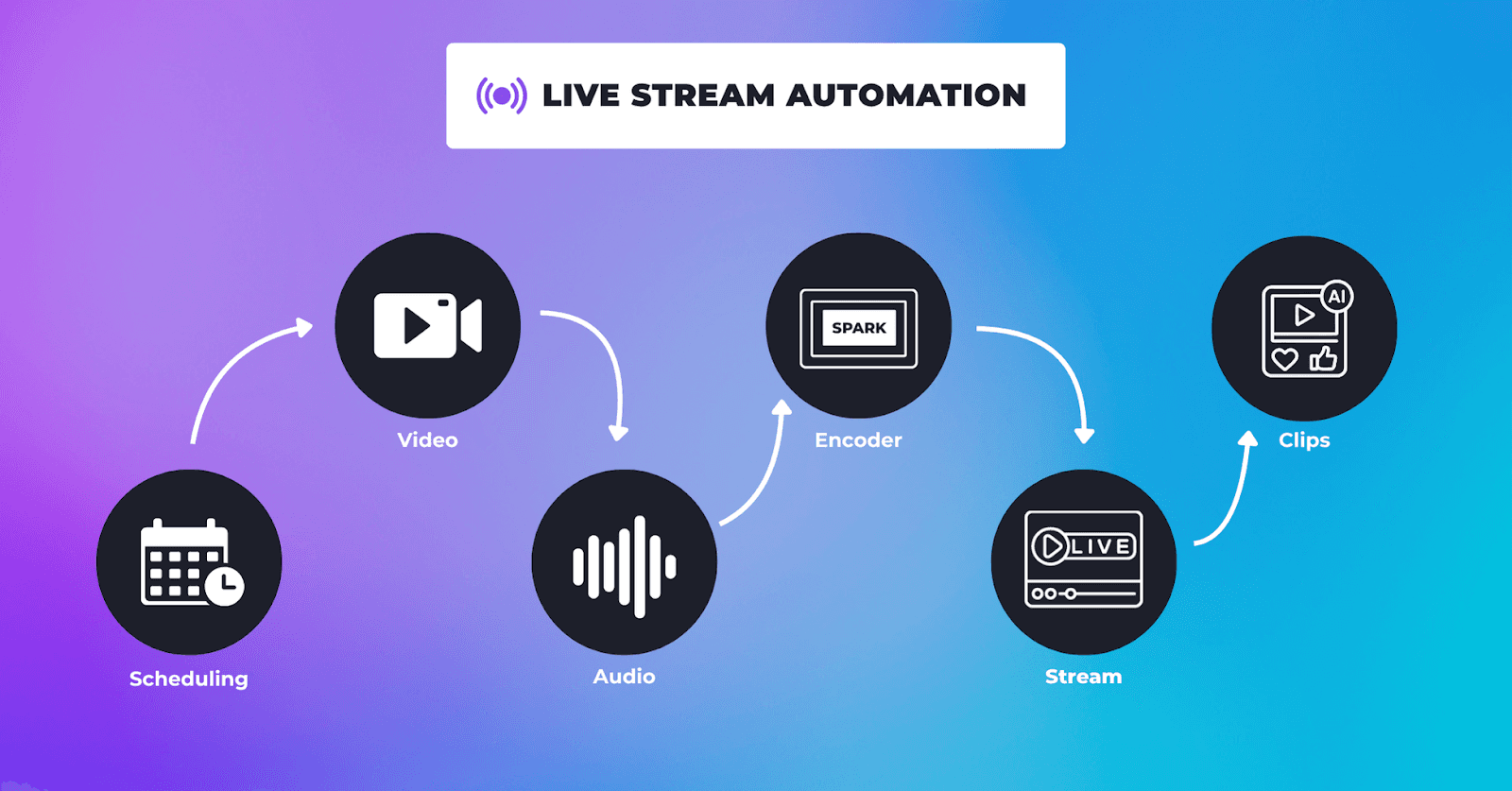
Automating video clipping fails most creators not because the technology is broken, but because the pipeline has more moving parts than anyone shows them upfront.
- The trigger
- The clipping step
- The wait
- The edit
- The approval
- The publish
These six distinct joints, and most creators plan for only two.
Why Automated Clipping Pipelines Fail Without Job Tracking
The pattern repeats across skill levels. A creator with a decent setup buys an automation tool, connects it to their clipping software, and waits for clips to appear. What they get instead is silence, or worse, a stream of clips they would never have chosen to post. The failure is not random. It traces back to a single assumption: that connecting two tools is the same as building a working pipeline.
The most overlooked joint is the wait. Clipping is processed as a background job, not an instant output. A creator uploads a 90-minute podcast, sees nothing happen for 45 minutes, assumes the workflow broke, runs it again, and ends up with duplicate clips queued for publishing. The bottleneck was never the clipping itself. It was the lack of a polling step or callback to tell the next stage when the job was actually done.
The Hidden Vulnerability of Multi-Tool Pipelines
The familiar approach is to stitch together separate subscriptions:
- One tool to detect new uploads
- Another to clip
- Another to caption
- Another to schedule
Each handoff is a potential point of failure, and each tool exposes only what it chooses to through its API. When one tool passes only a video title to the next step, everything downstream is working with incomplete information. Most creators who automate this way spend more time maintaining the pipeline than they would have spent clipping manually. Crayo's clip creator tool sidesteps this entirely by handling clipping, captions, voiceovers, and export inside a single workflow, which removes the handoff problem at the source rather than asking creators to engineer around it.
Why Connected AI Workflows Require End-to-End Execution
According to the Adobe Creators' Toolkit Report 2026, 98% of Indian creators say creative AI helps them produce content faster, but that speed only materializes when the underlying workflow is actually connected end to end. Speed promised by a single tool means nothing if three other tools in the chain are waiting on permissions, webhooks, or manual triggers that nobody set up. The same report found that 72% of creators said AI-assisted output still needs moderate or extensive editing before it is ready to share, which means the approval step is not optional. It is the step that protects your channel from publishing whatever the algorithm decided was a highlight.
Establishing Ownership to Protect Your Brand
The invisible step that breaks the most pipelines is ownership. Someone has to decide what happens when a clip comes out weak, when the transcript misfires on a technical term, or when the automated scheduler picks a posting time that conflicts with a live event. Without a named decision point, the tool's default behavior becomes the decision, and tools aren't built to protect your reputation. But what that missed approval actually costs you is more specific, and more surprising, than most creators expect.
Related Reading
- Best AI Podcast Clip Generator
- What Is An Audiogram Podcast
- How Long Does It Take To Trim A Zoom Recording
- Content Repurposing Examples
- Webinar To Short Clips AI
- Clipping a YouTube Video
- Podcast Clips For Social Media
- Video Clipping For Social Media
- How Do I Repurpose My Interview To Social Media
- Sermon Clips AI
The Hidden Cost of Automating Without a Check
Automation saves time on the stages that don't require judgment. It costs you on the stages that do. The gap between those two categories is where most video clipping pipelines quietly break down. The failure mode creators run into most often isn't a dramatic crash. It's a slow bleed. A creator sets up an automated clipping workflow, watches the first few outputs come out clean, and assumes the process is safe to scale. What they're actually doing is spot-checking a system they're about to stop watching. One successful run is not a sample size. It's an anecdote. And automation doesn't care about anecdotes; it repeats whatever it finds, good or bad, at full volume.
The Three Hidden Costs of Unvetted Automation
The cost shows up in three specific places.
- First, weaker clips get published because a tool's confidence score is treated as a verdict, not a signal. A score tells you the AI found this moment statistically interesting. It doesn't tell you the sentence was clipped mid-thought, the caption misspelled a guest's name, or the framing makes the host look unprepared.
- Second, creators spend money on connection tools like Zapier or Make before confirming whether their clipping tool exposes any triggers or API access. If the clipping tool doesn't offer a webhook, the glue software has nothing to attach to. The spend happens anyway.
- Third, and most damaging, errors repeat at scale. A wrong crop setting or an unedited file that slipped through once will post on every subsequent run until someone catches it manually.
Consolidating Workflows to Prevent Handoff Failures
Most creators handle this by choosing a clipping tool first and building automation around it afterward, often discovering mid-build that the tool doesn't support the connections they assumed it would. That's where the subscription stack grows:
- One tool for clipping
- Another for captions
- Another for scheduling
- Then a workflow platform to hold them together
Each handoff is a potential failure point, and each failure point requires someone to notice it before it scales. Crayo takes a different approach by consolidating clipping, captions, voiceovers, and export into a single workflow, removing most handoff failures before they can repeat.
What Actually Breaks the Pipeline
The pattern that surfaces consistently across clipping operations is this: the review step disappears first. It feels redundant once the workflow runs smoothly, and removing it is exactly the kind of efficiency move automation seems to justify. But the review step isn't redundant; it's the only stage where judgment enters the process. Without it, the tool's defaults become the editorial standard. Tools are not built to protect your reputation. They're built to complete tasks. Those are different jobs.
The break-even math on this is straightforward. A short clip check before publishing costs a few minutes per batch. The first time that check catches a clip with a misfired caption or a clipped sentence that changes the speaker's meaning, it has already paid for itself. The hidden cost of skipping it isn't just one bad post; it's every bad post that runs unchecked until someone notices something is wrong.
Related Reading
- Church Reels Editing
- Podcast Shorts
- How To Start Clipping On Instagram
- Best Video Clipping Tool For YouTube
- Repurposing Content For Social Media
- How To Add Audio To A Video
- How To Repurpose Webinar Content For Marketing
How to Automate Video Clipping in 30 Minutes

Seven steps make the pipeline logical. But logic and speed are different things, and the gap between them is where most creators stall. The setup is simpler than the step count suggests. You are not building infrastructure. You are making a series of small, confirmable decisions in a specific order, and each one removes a variable that would otherwise cause a silent failure later. The order matters because each decision narrows the next one.
1. Check the Tool Before Touching Anything Else
The failure point is usually invisible. A creator picks an automation platform, builds a workflow, and only then discovers that the clipping tool has no webhook, no Zapier app, and no API endpoint the workflow can call. The pipeline has nowhere to connect, and the whole build starts over. Spend the first five minutes on documentation, not software. Look for one of five things:
- An API, webhooks
- A native Zapier or Make integration
- An MCP server
- Built-in triggers such as a new YouTube upload or an RSS feed
If none of those exist, the trigger options are a schedule or a manual start, and the design adjusts accordingly.
Automating Triggers to Realize AI Speed
According to the ClipCreator.ai Blog, AI video editing tools can turn raw footage into polished content in minutes, but that speed only helps if the tool can receive the signal to start. A tool that cannot be triggered automatically is a tool you will always run by hand, regardless of what the rest of the pipeline does.
2. Match the Trigger to Where the Video Actually Lives
The wrong trigger fires at the wrong time, or never.
- A YouTube trigger on a file stored in Dropbox does nothing.
- A watch-folder trigger on a channel upload misses every recording.
The source location and trigger type must match exactly.
Automating the Initial Trigger Source
- If the video publishes to YouTube, use the YouTube upload trigger or an RSS feed.
- If recordings land in Google Drive or Dropbox, use a watch-folder trigger.
- If neither is available, a scheduled poll checks the location at set intervals and starts the run when something new appears.
Manual triggers are the last option, not the first instinct.
3. Build the Wait Before You Build Anything Else Downstream
Clipping is a background process. The job starts, runs for several minutes, and finishes asynchronously. A pipeline that moves to the next step immediately after triggering the clip job will either post nothing because the clips aren't ready, or run twice because it checks before the first run completes. Add a wait step, a polling loop, or a callback that fires when the job finishes. Only after that confirmation should the pipeline loop through the returned clips. One agent product notes that new uploads are detected within the hour, which means detection lag alone can add time before the clip job even begins. Build that window into the design, not as an afterthought.
4. Cap the Output Before it Scales
Most creators handle this by letting the tool return whatever it finds and then sorting through the results manually. That works for one video. For ten videos a week, it creates a backlog that grows faster than anyone can review, and the automation meant to save time creates a new kind of overhead. Set a maximum of three clips per source video. With one upload per week, that cap produces a small, reviewable batch. Without it, the same upload can return a dozen clips, and the pipeline either floods the publishing queue or generates unused clips. A cap isn't a tool limitation. It is a system constraint that keeps the output manageable.
Standardizing Templates for Efficient Review
The same logic applies to branding. Apply one template across every clip the pipeline produces:
- Consistent caption style
- A fixed opening hook format
- Logo placement that doesn't vary
The template is not about aesthetics. It is about making the output consistent enough that a quick review can catch anything that falls outside the standard, rather than evaluating each clip from scratch.
5. Keep a Human in the Loop at the Start
Automated clip selection picks the best clip roughly 55 to 65 percent of the time, according to one roundup of clipping tools. That accuracy is useful. It is not reliable enough to publish unsupervised from day one. Route finished clips to a drafts queue. Review each one against a short checklist before it posts. The checklist does not need to be long:
- Does the clip start and end cleanly?
- Does the caption reflect what was actually said?
- Is the speaker identified correctly?
Three questions, two minutes per clip. That is the cost of keeping the pipeline from publishing something you would not have chosen.
Eliminating Pre-Publication Cleanup Through Consolidation
Most creators who build a multi-tool stack for clipping, captions, and scheduling discover that each handoff between tools is a new place for a clip to arrive wrong, a caption to misfire, or a file to export in the wrong format. Crayo consolidates clipping, subtitles, voiceovers, and export into a single workflow, which means the clip that enters the review queue is already formatted, captioned, and ready to post. The approval step stays, but the pre-publication cleanup disappears.
6. Publish Only What You Own
Automation scales whatever you point it at. That is the feature. It is also the risk. A pipeline connected to content you do not own, or set to repost the same unedited file across multiple platforms, creates legal exposure and platform penalties that accumulate quietly until something forces them into view. The rule is simple: publish only to accounts you control, using recordings you own or have written permission to use. Stagger the schedule across platforms and vary the packaging, even slightly, rather than pushing the same file everywhere at once. Some platform guides report reach penalties for repeated unedited reposts, and a pipeline running at scale will hit those limits faster than a manual posting schedule would.
7. Measure Per Clip, and Set a Failure Alert
Aggregate metrics hide the signal. A weekly total of 12,000 views across six clips tells you the pipeline is producing reach. It does not tell you that four of the six clips drove almost all of it, or that the other two consistently underperform because they come from the middle of the episode rather than the opening or the close.
Optimizing Automated Video Workflows
Record each clip's result next to its source timestamp. After four weeks, the pattern becomes readable:
- Which moments in a recording generate the most engagement?
- Which caption styles hold attention?
- Which topics does your audience return to?
Automatic video editing saves hours of manual editing time per video, and those hours compound in value when data from each clip feeds back into better selection decisions. Set a failure alert before the pipeline goes live. When a run produces nothing, or errors out silently, you want a notification within the hour, not a week later when you notice the publishing queue has been empty. A stuck pipeline is invisible by default. The alert makes it visible.
What the 30 Minutes Actually Looks Like
- The first ten minutes go to the tool check and trigger selection.
- The next ten go to building the wait step, setting the cap, and applying the template.
- The final ten go to connecting the drafts queue, setting the failure alert, and running one test clip through the full sequence to confirm each stage hands off correctly.
That is the full build. Not a multi-day project. Not a stack of six subscriptions. One confirmed sequence, tested once, then left to run.
Testing and Refining the Pipeline
The part most creators skip is the test. They build the pipeline, assume it works, and find out otherwise when the first real video goes through, and something breaks at the wait step or the template fails to apply. A single test clip, run deliberately before any real content enters the pipeline, catches that failure in a controlled moment instead of a public one. The pipeline you build in 30 minutes will not be perfect. It will be functional, observable, and fixable, which is more than most creators have after weeks of tinkering with disconnected tools. What happens in the first real run, though, is where the setup either proves itself or reveals exactly where the design needs one more adjustment.
The 30-Minute Workflow to Build Your First Clipping Automation

The seven steps only work in sequence, and the sequence only works if you make the decisions behind it before the first clip ever renders. What you build in those 30 minutes is not just a workflow. It is a set of standing instructions that runs on your behalf every time a new video enters the pipeline.
Minute 0-4: Plan the Pipeline
Write down three things before opening any tool:
- Where do your videos arrive?
- How many clips do you want per video?
- Whether you need an approval step before anything posts?
That one-line decision (source, trigger, clip count, approval on or off) is the foundation everything else sits on. Skipping it means you will make those same choices under pressure, mid-build, when the cost of a wrong answer is higher. The approval question deserves a real answer, not a default. If you are publishing to an audience that expects a consistent voice, start with approvals on. You can always remove the gate once the output earns your trust.
Minutes 4-12: Write the Rules Once
The rules brief is the part most creators skip, and it's why their clips feel inconsistent three weeks into automation. Write it now:
- Clip length range
- Number of clips per video
- Subtitle style
- One specific rule about how every clip must open
That opening rule matters more than it sounds. A clip that begins "Welcome back to the channel" is already losing. Require the first sentence to state the core claim directly, something like "Most new channels burn out in six weeks." The claim earns attention. The greeting does not.
The brief does not need to be long. It needs to be specific enough that the clipping step produces recognizable output without you touching it. Write it once, apply it to every run, and update it only when the output tells you something has drifted.
Minutes 12-20: Run It on a Known Video
Test on a video you already understand. That constraint is not arbitrary. When you know the source material, you can judge the output against something real instead of guessing whether the clips are actually good. Connect the trigger to the clipping step, add the wait or callback between them (this is the step that prevents duplicate clips when background processing runs long), and let it run. If your clipping tool has no trigger, upload the video manually and automate every step after it. The manual upload is not a failure of the workflow. It is a documented starting point. The pattern that surfaces here is consistent across every automation setup: the first run on a known video always reveals one wrong assumption. That discovery is the point. Finding it on a video you already understand costs nothing. Finding it on a live upload costs credibility.
Minutes 20-26: Review With a Checklist, Not a Gut Check
Send the clips to a drafts queue and run the same five checks on each:
- Does the opening start on the claim?
- Are names and numbers accurate in the captions?
- Does the clip finish its idea?
- Do you own or have rights to the source?
- Is the format correct for the platform?
This is not bureaucracy. It is the difference between catching an error once and publishing it at scale. When the same problem appears in two or more clips, stop fixing the clips. Fix the rule. A correction made in the brief propagates forward to every future run automatically. A correction made to an individual clip disappears the moment the next video processes.
Standardizing Review With Checklists
Most creators handle the review step by watching clips and making judgment calls in the moment. That works for one clip. It breaks down when the pipeline produces five clips per video across three uploads a week, because the mental overhead compounds faster than the output. A checklist removes the cognitive load and makes the review repeatable. Clipping and captioning take up most of the manual time before automation. According to the Aibrify Blog, creators spend more than 10 hours per week on content creation before any automation is in place. That is the number the rules brief and review queue are designed to cut, not by removing judgment, but by concentrating it in one short, deliberate pass instead of spreading it across every individual clip.
Consolidating Workflow to Prevent Bottleneck
The familiar approach here is to review clips inside the clipping tool itself, making small edits to each one before exporting. That works until the volume grows, at which point the editing queue becomes its own bottleneck and the time savings from automation disappear into manual corrections. Crayo sidesteps this by handling clipping, captions, voiceovers, and export inside a single workflow, so the review step is a pass on finished output rather than a round of post-processing fixes across disconnected tools.
Minutes 26-30: Schedule, Alert, and Record
Schedule the approved clips at a steady cadence across your accounts. Steady means predictable to your audience and manageable for the algorithm. It does not mean maximum frequency. Set one failure alert. When the pipeline runs and produces nothing, you need to know within the hour, not the next time you check manually. Silent failures are the most expensive kind because they look like inactivity from the outside and broken infrastructure from the inside. Save a note with each clip: the source video, the timestamp where the clip originated, and the scheduled date. That record connects published performance back to specific decisions in the pipeline. Without it, you are optimizing blind.
What the First Real Run Actually Tells You
The first run on a real video (not the test clip, but the first live upload that goes through the full pipeline) will surface something the test did not. It always does. The source might arrive in a slightly different format. The trigger might fire a few seconds before the file is fully processed. The caption font might render differently on a vertical crop than it did on the test frame. None of these are reasons to distrust the pipeline. They are the pipeline doing its job: surfacing edge cases in a controlled moment rather than letting them accumulate invisibly across dozens of runs. Each one gets a fix in the rules, not in the clip, and then it is resolved for every video that follows.
Scaling Content Output Through Automation
30 days of social media content can be created in under 60 minutes with the right automation in place. That outcome is not the result of a faster clipping tool. It comes from a pipeline where you write the rules once, the review is a checklist rather than a judgment call, and the record-keeping makes each run smarter than the last.
The Before-and-After Is Not About the Tool
The gap between a bare trigger-to-clipper setup and a complete pipeline is not a technology gap. It is a decisions gap. The bare setup leaves waiting, checking, and source ownership to chance. The complete pipeline decides all three in advance and builds the enforcement into the workflow itself. That is what the 30 minutes buys. Not perfection. A system that is observable, correctable, and already running while you focus on finding the next great clip.
Automate Video Clipping Faster With Crayo
The clipping step is where most automation plans stall. Not because the workflow logic is wrong, but because the tool handling the actual cut has never been tested against your rules. Open Crayo, upload one finished video, and generate vertical, captioned clips before you wire up any triggers. That single test run tells you more about your pipeline's viability than an hour of planning ever could.
Catching Errors Before Unsupervised Output
Creators who skip this step often discover the problem backward, after a week of silence or a queue of clips that never matched their voice. Crayo handles clipping, captions, and export in one workflow, so there is no handoff to debug and no second subscription to blame when output looks wrong. You see exactly what the automation will produce, and you can adjust the rules before anything runs unsupervised.
Establishing Trust Through Initial Testing
That first reviewed run also makes the checklist from the earlier sections real, not theoretical. Once you have seen what an unreviewed clip looks like from your own footage, publishing without a check stops feeling like a time-saver and starts looking like a liability. The test earns the trust that lets you loosen the approval gate later.
Related Reading
• How To Automate My Video Clipping
• Best AI Video Clipping Tools 2026
• Best Audiogram Maker
• How To Trim A Zoom Recording
• Content Repurposing Tool
• Best Way To Make Podcast Clips
• Best AI Video Repurposing Tools 2026
• Best AI Video Tools Like Vizard For Webinar Clips
• How To Trim Google Meet Recording