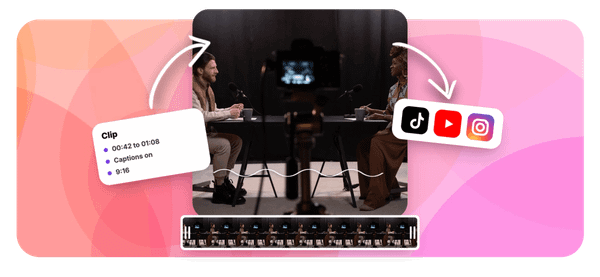
If you create content for YouTube, you already know how hard it is to turn long videos or podcast recordings into short clips that people actually watch. Whether you are trying to repurpose episodes using the best AI podcast clip generator or simply cut highlights from your latest upload, finding the right video clipping tool can save you hours every week. This article walks you through the 7 best video clipping tools for YouTube you can test in 30 minutes or less.
One tool worth putting at the top of your list is Crayo's clip creator tool. It takes your raw footage and quickly identifies the strongest moments, helping you produce shareable YouTube clips without needing editing experience or expensive software. If your goal is faster video editing, better clip quality, and more views, Crayo gives you a direct path to get there.
Table of Contents
- Why Creators Struggle to Pick the Right YouTube Clipping Tool
- The Hidden Cost of Trusting a Generic Best Overall Ranking
- 7 Best Video Clipping Tools for YouTube to Try in 30 Minutes
- The 30-Minute Workflow to Choose Your YouTube Clipping Tool
- Get Accurate, Content-Matched Clips Faster With Crayo
Summary
- AI-powered clipping tools vary dramatically in accuracy depending on content format, and most comparison guides never disclose this distinction. Documented testing shows that single-speaker talking-head content hits roughly 90% accuracy on top tools, while multi-speaker content drops to the low 70s, and comedy or humor-driven content falls below 35% across every tool tested. Choosing a tool based on a generic "best overall" ranking without checking format-specific performance is one of the fastest ways to waste an editing budget.
- Manual review time is a hidden cost that compounds quickly even when creators use well-matched tools. Documented testing confirms that 2 to 8 minutes of review and adjustment per clip is a realistic budget, and since one long-form YouTube video can produce 8 to 12 short clips, that adds up to significant time per week. Most tools handle roughly 70 to 80 percent of the work, not the fully automated experience some marketing implies.
- Editing and production is the top struggle for YouTube creators, according to an analysis of 27,555 creator comments, with 21.4% of respondents identifying it as their primary challenge. That statistic reflects more than time spent editing. It is the compounding effect of using a mismatched tool, absorbing its errors in manual cleanup, and still ending up with clips that don't reflect the channel's actual value.
- Mismatched tool selection creates a problem that looks like a production issue but is really a selection issue. When a clipping tool is optimized for a different content format than the one being processed, most editing time goes toward fixing what the tool got wrong rather than building what the channel needs. This pattern mirrors findings from IBM Think Insights, which reports that poor data quality costs organizations an average of $12.9 million per year because errors introduced early in a process are absorbed by every downstream step.
- Testing with real footage, not demo videos, is the most reliable way to evaluate a clipping tool before committing to a paid plan. Documented accuracy figures come from controlled testing conditions, not from a specific creator's vocabulary, pacing, or audio environment. One long-form YouTube video can produce 8 to 12 short clips for TikTok, Reels, and YouTube Shorts, but that output potential only matters if the clips generated from actual footage are usable without heavy correction.
- AI clip finder tools typically cost between $19 and $49 per month and make financial sense when producing clips from three or more videos per week, according to YTCut's 2026 analysis. That math only holds if the tool is genuinely reducing workload rather than adding a new category of correction tasks. Creators who stitch together separate tools for clipping, captions, reformatting, and voiceover absorb compounding friction at every handoff, which quietly inflates the real cost of production.
Crayo's clip creator tool addresses this by consolidating auto-clipping, caption generation, subtitle styling, and AI voiceovers into a single workflow, reducing handoffs between tools where review time typically accumulates.
Why Creators Struggle to Pick the Right YouTube Clipping Tool
Picking the right YouTube clipping tool is harder than it looks, and the reason has nothing to do with a shortage of options. The real problem is that most comparison guides hand you a single "best overall" winner without telling you what content type that ranking was actually tested on, and documented 2026 accuracy data shows that gap matters enormously.
According to the Choppity Blog's roundup of 11 AI YouTube clip makers tested and compared, a 60-minute video typically yields 10 to 20 clips and takes just 10 to 20 minutes from upload to ready to post. That speed is real. But speed toward the wrong result is just a faster way to waste your editing budget.
Format-Specific Tool Accuracy
Talking-head content with a single speaker hits roughly 90% accuracy on top tools, while multi-speaker content drops to the low 70s, and comedy or humor-driven content falls below 35% on every tool tested. Those are not minor variations. They are the difference between a tool that fits your channel and one that quietly underperforms while you wonder what went wrong.
The failure point is usually invisible at first. A creator picks a top-ranked tool, runs their panel interview or roundtable through it, and gets clips that feel slightly off. The moments chosen aren't wrong exactly; they just aren't the moments that made the episode worth watching. That's what happens when a generic virality-scoring engine optimizes for broadly loud or high-energy signals instead of the specific insight or exchange that your audience actually shares. The tool isn't broken. It's just built for a different kind of content than yours.
The Reality of Manual Review
Most creators also underestimate how much manual review time remains even with a well-matched tool. Documented testing suggests budgeting 2 to 8 minutes per clip for review and adjustment, depending on content complexity, because even the strongest current tools handle roughly 70 to 80 percent of the work rather than the fully automated experience some marketing implies.
The common approach is to treat a fully automated label as a promise of zero post-processing, then be surprised when each clip still needs trimming, caption correction, or timing fixes before it's publish-ready. Crayo's clip creator tool addresses this directly by bundling auto-clipping, captions, subtitle styling, and speech enhancement into a single workflow, so the remaining manual steps are faster and fewer than when you're stitching together separate tools for each task.
Content Fit Overcomes Production Friction
According to the OverseerOS Blog's analysis of 27,555 creator comments, editing and production ranked as the number one struggle for YouTube creators at 21.4%. That stat lands differently when you understand the mechanism behind it. The struggle isn't just time. It's the compounding friction of using a tool that doesn't match your content type, then spending manual cleanup time compensating for the mismatch, and still ending up with clips that don't reflect your channel's actual value. The right tool, matched to the right content structure, removes that friction at the source, not at the end. But knowing that content-type fit matters is only half the answer.
Related Reading
- Best AI Podcast Clip Generator
- What Is An Audiogram Podcast
- How Long Does It Take To Trim A Zoom Recording
- Content Repurposing Examples
- Webinar To Short Clips AI
- Clipping a YouTube Video
- Podcast Clips For Social Media
- Video Clipping For Social Media
- How Do I Repurpose My Interview To Social Media
- Sermon Clips AI
The Hidden Cost of Trusting a Generic Best Overall Ranking
Matching a tool to your content type is half the equation. The other half is understanding what happens to your time and budget when you skip that step.
Hidden Costs of Tool Mismatch
Data workers spend up to 50% of their time dealing with data quality issues. The parallel for video creators is uncomfortably close. When a clipping tool doesn't match your content, you don't just get weaker clips. You get a workflow where most of your editing time goes to fixing what the tool got wrong, not building what your channel actually needs. That's not an automation problem. That's a selection problem disguised as a production problem.
The failure point is usually invisible at the subscription stage. A tool ranked highly overall looks credible. The pricing page doesn't mention that its 90% accuracy figure applies to single-speaker talking-head content, not the panel discussions or comedy sketches you actually produce. So you pay, you upload, and then you spend the next hour manually overriding clip selections that missed the point entirely. The tool isn't broken. It's just built for someone else's content.
Reducing Review Bottlenecks
Most creators handle this by adding more manual review time to compensate, treating it as a normal part of the process. That workaround quietly compounds. At 2 to 8 minutes of review per clip, across 10 to 20 clips per video, per week, the hours add up faster than most production schedules account for. Crayo is built to remove that bottleneck by handling auto-clipping, captions, subtitle styling, and AI voiceovers in a single three-step workflow, so review time shrinks rather than expands as your output volume grows.
Mitigating Tool Selection Risks
The cost of a mismatched tool isn't always visible in a single session. IBM Think Insights reports that poor data quality costs organizations an average of $12.9 million per year, and while that figure covers enterprise data systems, the underlying dynamic is the same: when the inputs to a process are wrong, every downstream step absorbs the error. For a creator, the input is tool selection. Get it wrong, and every clip, every upload, every missed growth opportunity carries that original mismatch forward.
The concrete fix requires only a few minutes of pre-commitment research. Check documented accuracy for your specific content format before subscribing. Budget realistic review time per clip before building your publishing schedule. Test any tool with your actual footage, not a polished demo video, because documented accuracy varies enough by content type that a demo result tells you almost nothing about your real-world output.
Related Reading
- Church Reels Editing
- Podcast Shorts
- How To Start Clipping On Instagram
- How To Trim A Zoom Recording Saved On My Computer
- Best Video Clipping Tool For YouTube
- Repurposing Content For Social Media
- How To Add Audio To A Video
- Podcast Reels
- How To Repurpose Webinar Content For Marketing
7 Best Video Clipping Tools for YouTube to Try in 30 Minutes

Matching a tool to your content type is the right instinct. But knowing which tool wins on paper and knowing how to use it without bleeding hours into setup are two different problems.
1. Choppity
Choppity earns its place for conversational and interview-style YouTube content specifically because it finds complete moments, not just loud ones. Documented testing shows it outperforming major competitors on AI accuracy for this format, with stronger caption customization and direct social publishing built in. For creators whose content is two people talking through a real idea, that context-awareness matters more than raw speed.
2. Opus Clip
Documented testing puts Opus Clip at roughly 92% accuracy on single-speaker, talking-head content, among the highest figures recorded for that format. The hands-off experience is real: minimal setup, automated highlight detection, and virality scoring that works well for entertainment-driven content. A documented limitation is that virality scoring can underweight nuanced insights, which matters if your audience follows you for expertise rather than entertainment.
3. Vizard
The failure point in most clipping workflows isn't the clip itself. It is the gap between a finished clip and a published post, where creators lose time switching between editing tools, caption tools, and scheduling tools. Vizard closes that gap by handling clip discovery, reframing, and multi-platform publishing inside a single pipeline, which documented comparisons identify as its primary strength over more narrowly focused competitors.
Consolidating the Publishing Workflow
Most creators handle that publishing gap by stitching together three or four separate tools, each with its own export format and login. The friction compounds quickly, especially when you produce ten or more clips per week. Crayo addresses this directly by consolidating auto clipping, caption styling, AI voiceovers, and background removal into one workflow, so the distance between finding a great moment and publishing a polished short shrinks from a multi-step process to something closer to three decisions.
4. Autoposting.ai
Multi-speaker content is where documented accuracy drops hardest across every tool in this category. Autoposting.ai leads specifically on that format at 74% accuracy, ahead of the next closest competitor at 72%. That two-point margin sounds small, but when you are processing a 90-minute panel discussion, the difference compounds across dozens of potential clips.
5. Klap
The same issue shows up across faceless channels and YouTube-first formats: most clipping tools are built around a visible, trackable speaker. Klap is specifically designed for channels without a consistent on-camera presence, a distinct use case that general-purpose tools handle poorly. If your content is screen recordings, narrated tutorials, or topic-driven video without a face to follow, this distinction matters more than any virality score.
6. Descript
Descript sits at the intersection of AI assistance and manual control, a specific kind of value fully automated tools cannot replicate. Documented testing places it at 72% accuracy on multi-speaker content, close to the category leader, while its text-based editing interface lets you make precise cuts through the transcript rather than scrubbing a timeline. For creators who want AI suggestions but want to override them without friction, that combination is genuinely useful.
7. CapCut
CapCut is not a specialized clipping tool. It is a general-purpose video editor with some AI-assisted features, available for free, and documented guidance consistently identifies it as the strongest zero-cost entry point for creators not yet ready to commit budget to a dedicated platform. The honest trade-off is more manual moment-hunting on your end, but that is a reasonable cost when you are testing whether a clipping workflow is worth building at all.
What Changes When You Match Tool to Content Type
Before this kind of matching, most creators pick a tool based on a "#1 overall" ranking and apply it uniformly across every video they produce. The result is predictable: a tool optimized for talking-head content grinding through a multi-speaker panel, producing clips that need heavy manual repair.
After matching, you choose the tool documented to perform on your specific format, with realistic review time already built into your schedule. The critical difference is not finding a universally superior tool. It is stopping the practice of applying a general winner to a specific problem and wondering why the output keeps disappointing.
The 30-Minute Workflow to Choose Your YouTube Clipping Tool
Knowing which tool fits your content type narrows the field. What separates creators who move fast from those who stay stuck is what happens in the thirty minutes after that match is made. The failure point is almost always the same: a creator identifies a promising tool, reads strong reviews, and commits to a paid plan before running a single frame of their own footage through it. Documented accuracy figures come from controlled testing conditions, not from your specific vocabulary, your pacing, or the way your guests talk over each other in the first ten minutes of every episode. Those variables matter more than any benchmark score.
Minute 0-5: Identify Your Actual Content Type
Confirm whether your YouTube content is primarily single-speaker talking-head, multi-speaker conversational, comedy-driven, or faceless before you open a single tool. This classification is not a formality. Documented accuracy varies so dramatically across these categories that skipping this step means every subsequent decision is built on the wrong foundation.
Minutes 5-10: Match to Your Documented Best-Fit Tool
Using the content-type breakdowns covered in the previous sections, select one or two tools specifically documented as strongest for your identified format. The goal here is to apply documented accuracy data directly, not to default to whichever tool has the most visible marketing presence or the most upvotes in a forum thread. Most creators skip this step entirely. They pick the tool they heard about first, or the one a peer mentioned, and treat general reputation as a reliable proxy for fit. It is not. A tool that performs at 92% accuracy on talking-head content can fall below 35% on comedy-driven material, and no amount of positive reviews changes that gap.
Minutes 10-20: Test With Your Own Real Footage
Run a video that genuinely represents your typical content through your matched tool's free tier or trial. Not a demo video. Not a clip the tool's own marketing team selected because it performed well. Your actual footage, with your actual audio quality, your actual editing rhythm, and your actual subject matter.
According to the YTCut Blog's 2026 analysis of YouTube clip management tools, one long-form YouTube video can produce 8 to 12 short clips for TikTok, Reels, and YouTube Shorts. That output potential matters only if the clips generated from your footage are usable without hours of correction. The test is not whether the tool works in general. The test is whether it works on your video specifically.
Minutes 20-25: Time Your Manual Review Process
Track how long you actually spend reviewing and adjusting the generated clips before they are ready to publish. Write the number down. Creators often underestimate this step because they assume AI output is closer to finished than it actually is, and that assumption quietly inflates the real cost of using a mismatched tool. The familiar approach is to eyeball a few clips, feel reasonably satisfied, and move on. What that misses is the cumulative weight of small corrections across ten or fifteen clips per video, week after week. When you track actual review time against a realistic benchmark, the gap between a well-matched tool and a mismatched one becomes impossible to ignore.
Streamlining Multi-Tool Workflows
Many creators who produce clips at volume handle this by stitching together multiple tools:
- One for clipping
- One for captions
- One for reformatting
- One for voiceover
The friction compounds with every handoff. Crayo consolidates auto-clipping, caption generation, subtitle styling, and AI voiceovers into a single workflow, so the review step stays in one place instead of being split across three browser tabs and two export queues.
Minutes 25-30: Decide Based on Real Results, Not Marketing Claims
Compare your actual review time and clip quality against your weekly production needs, then commit to a paid plan only if the numbers hold up. AI clip finder tools cost between $19 and $49 per month and make financial sense when producing clips from three or more videos per week. That math only works if the tool genuinely reduces your workload, not adds a new category of correction tasks. Improvement doesn't come from finding a universally superior tool. It comes from running a structured thirty-minute test that produces real data about your specific content before you make any financial commitment. A decision built on that data is a decision you can actually trust.
Get Accurate, Content-Matched Clips Faster With Crayo
That question, the one most creators never think to ask, is simply this: what happens after you pick the right tool? The answer is that you stop researching and start publishing. Crayo makes that shift immediate.
- Upload your video
- Select your subtitle style
- Generate a clip
Batch built around your specific content type, without a separate accuracy comparison research phase eating into your production time. Creators who consistently get strong results from their YouTube content aren't the ones with the most sophisticated tool stacks. They are the ones who removed the friction between finding a great moment and publishing a polished, platform-ready short.
Unified Workflow for Scalable Virality
Crayo consolidates auto-clipping, captions, AI voiceovers, and subtitle styling into a single workflow, so your review time goes toward refining clips, not managing five separate tools or second-guessing whether you chose the right platform. Going viral is not luck. It is volume, speed, and a workflow that does not break down between the raw footage and the published clip. Start with Crayo, and spend your time where it actually counts.