
Have you ever watched a long podcast or video and thought, "This one moment is too good not to share"? That is exactly what clipping in social media is about. It is the practice of pulling short, focused segments from longer content like podcasts, interviews, or streams and sharing them as standalone video clips across platforms like TikTok, Instagram Reels, or YouTube Shorts. This article explains what clipping means, why creators and brands use it to grow their audiences fast, and seven practical ways you can start doing it yourself in 30 minutes or less.
Getting started is easier than most people expect, especially with the right tool. Crayo's clip creator tool, the best AI podcast clip generator, does the heavy lifting by automatically identifying the strongest moments in your audio or video and turning them into polished, ready-to-post clips. Instead of spending hours scrubbing through footage, you get shareable short-form video content quickly, so you can focus on what actually matters: reaching more people and building a presence that grows consistently over time.
Table of Contents
- What Clipping in Social Media Means, and Why Creators Struggle
- The Hidden Cost of Social Media Clipping Without a Workflow
- 7 Ways to Use Clipping in Social Media
- The 30-Minute Workflow to Create Your First Social Clip
- Create Shareable Short-Form Clips With Crayo
Summary
- Short-form video generates up to 2.5x more engagement than long-form video on social media, but that structural advantage only pays off when the clip earns attention on its own terms. A 45-second clip that starts mid-sentence or ends without resolution is still weak content, just shorter. The format creates opportunity; the content inside the format determines whether that opportunity converts.
- Most clipping failures are communication problems, not length problems. Creators often find an energetic moment, trim around it, and post without considering whether someone unfamiliar with the source can follow the logic. A clip that requires prior context to make sense is not a standalone asset. It is a fragment, and fragments do not hold attention in a feed built around complete ideas.
- The hidden cost of clipping without a workflow is not bad clips. It is the accumulation of repeated decisions across every publishing cycle. AI video workflows can process transcripts and identify strong moments at a fraction of the traditional manual cost, but that efficiency compounds only when teams define selection criteria once and apply them consistently, rather than rebuilding them for each request.
- Caption accuracy and rights clearance are the two review steps most teams defer until after a problem surfaces. Automatic captions require human review under W3C accessibility guidance, and inaccurate numbers, names, or negations in on-screen text undermine a clip's credibility even when the audio is correct. On the rights side, no fixed clip length qualifies automatically for fair use under U.S. copyright law.
- Clipping applies across more content types than most teams actively use. Podcast answer clips, livestream highlights, educational how-to segments, expert interview excerpts, webinar Q&A clips, customer testimonial moments, and event recaps each serve a distinct audience need and generate different downstream value. Over 70% of marketers plan to increase social media content budgets in 2025, which means more footage worth clipping is already in production.
- Marketers who plan content in advance are 3x more likely to report success, and content batching can save up to 30% of time spent on social media management. It comes from running the same structured sequence, source selection, complete moment identification, platform-specific formatting, caption verification, and rights confirmation, on every recording, so the decisions that once required 20 minutes of re-watching raw footage become a repeatable two-minute check.
Crayo's clip creator tool addresses the repeated discovery problem by automating moment identification and building platform-ready formatting into the clip creation process rather than treating it as a separate step.
What Clipping in Social Media Means, and Why Creators Struggle

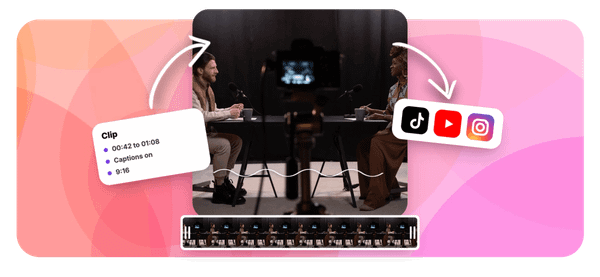
Clipping in social media means extracting a short, self-contained segment from a longer recorded source, whether that's a podcast, livestream, interview, or webinar, and preparing it to stand alone on a feed. The key word is self-contained. A clip is not a preview. It is not a trailer. It is a complete idea, delivered in a format the destination platform actually rewards.
Prioritizing Narrative Clarity and Standalone Value
The failure point is usually this: creators treat clipping as a length problem, not a communication problem. They find a loud moment, trim the edges, and post it. But the viewer who never heard the original episode has no idea who is speaking, what question prompted the answer, or why any of it should matter to them. Duration dropped. Meaning stayed behind.
According to Oberlo, short-form video content generates up to 2.5x more engagement than long-form video on social media, which tells you the format works. What it does not tell you is that the format only works when the clip earns its own attention. A 45-second clip that starts mid-sentence and ends without resolution is still a bad piece of content, just a shorter one.
Overcoming Attention Constraints With Automated Workflows
The same issue surfaces across podcast teams and solo creators alike: the edit gets treated as a production step rather than a creative decision. Most teams handle this by scrubbing through recordings manually, picking whatever felt exciting in the moment, and exporting without checking whether captions are accurate or whether the aspect ratio fits a vertical feed. The hidden friction compounds quietly.
A BCG Report via Livemint found that user attention spans have dropped by 25% to just 8 seconds, which means a clip that takes three seconds to establish context has already lost a significant share of its potential audience. Crayo's clip creator tool addresses this by automating the identification of strong moments and formatting them for the platform, so production stops eating creative decisions.
Navigating Legal Compliance and Content Discipline
Legal dimensions also exist that most creators skip entirely. Clipping your own content is straightforward. Clipping someone else's recording is not. The U.S. Copyright Office is explicit that fair use depends on multiple contextual factors, and no fixed number of seconds qualifies automatically. Platform-specific sharing permissions add another layer. A Twitch clip shared outside Twitch, or a webinar excerpt redistributed without the host's consent, can create real exposure regardless of how short the segment is. What makes clipping genuinely difficult is not the technical edit. It is the discipline of treating every clip as a standalone argument:
- One clear idea
- One payoff
- Formatted for one specific feed
Most creators know this in theory. In practice, the gap between knowing and executing is where most clips quietly fail.
Related Reading
- Best AI Podcast Clip Generator
- What Is An Audiogram Podcast
- How Long Does It Take To Trim A Zoom Recording
- Content Repurposing Examples
- Webinar To Short Clips AI
- Clipping a YouTube Video
- Podcast Clips For Social Media
- Video Clipping For Social Media
- How Do I Repurpose My Interview To Social Media
- Sermon Clips AI
The Hidden Cost of Social Media Clipping Without a Workflow

The real expense isn't the editor's hourly rate or the software subscription. It is the invisible tax paid in repeated decisions, abandoned footage, and fixable mistakes that compound quietly across every publishing cycle.
Where the Waste Actually Lives
When a team produces a 45-minute interview and publishes it once, they have not finished the job. They have completed the first half. The second half, selecting the moments that can stand alone on a feed, assigning each one a clear audience question, and confirming each clip has the rights and accuracy to be published, is where most teams simply stop. Not because they are careless, but because no one built a system for it. The footage sits in a shared drive, marked complete, while the strongest ideas inside it never reach a short-form audience.
Eliminating Redundant Discovery in High-Volume Workflows
The familiar approach is to treat each clip request as a one-off task:
- A colleague asks for an Instagram cut.
- An editor returns to the raw file.
- Re-watches the relevant section
- Re-confirms context
- Trims
- Captions
- Exports
That process works once. When it repeats across 15 or 20 clips a month without a shared clip brief or approved source range saved with timecodes, the discovery phase happens again and again for the same footage. According to a LinkedIn post by Mohammed Daud, AI video workflows can process transcripts and slice long footage into short clips at a fraction of the traditional cost, which matters most when teams are still rebuilding context manually for every request instead of deriving edits from a single approved master.
The Caption and Rights Problem Nobody Tracks
Inaccurate captions create a second review cycle that most production logs never capture. A clip looks finished. Then someone notices the speaker's name is misspelled in the lower third, or a number in the transcript is wrong, or the frame cuts off the whiteboard the speaker is pointing at. That correction takes ten minutes, but it also breaks the publishing schedule and resets approval. Multiply that across a month of clips and the rework hours become a budget line that never appears on any invoice.
Mitigating Legal and Copyright Risks in Distribution
The rights question carries a sharper consequence. A clip that cannot legally be distributed has consumed editing time, caption review, and approval cycles without producing a usable asset. The U.S. Copyright Office is clear that no automatic safe harbor exists for short excerpts; fair use depends on four specific factors, and the burden of confirming those factors falls on whoever presses publish. Teams that skip this step do not save time. They defer a risk that occasionally becomes a real cost. Solutions like Crayo address the workflow layer by centralizing clip creation, reducing the manual handoffs where these errors typically enter.
The System Gap, Not the Skill Gap
Most teams clipping social content aren't short on talent. They are short on structure. The cost of clipping without a workflow is not one bad clip or one missed moment. It is the steady accumulation of repeated decisions, preventable corrections, and unused footage that adds up across months.
Sight AI's blog outlines how content production costs can be reduced through proven strategies without sacrificing quality, and the common thread across those strategies is replacing repeated judgment calls with repeatable checkpoints. That shift does not require more people or more budget. It requires deciding once what a good clip looks like, then building the process around that decision rather than reconstructing it from scratch each time.
7 Ways to Use Clipping in Social Media

Clipping works best when the source material contains something worth isolating. Not every recording qualifies, and not every moment inside a qualifying recording earns its own clip. The seven uses below each start from a specific audience need, which is what separates a clip with a job from a clip that simply exists.
1. Podcast Answer Clips: One Question, One Answer
A podcast answer clip extracts a single practical question and its complete resolution from a longer interview or episode. The key word is complete:
- The question
- The explanation
- The conclusion all travel together
Pull a 48-second answer to "Why do new clients disappear after the proposal?" from a 60-minute business podcast, and the viewer gets full insight without sitting through the rest of the episode. A funny sentence alone does not carry the point. Context and speaker approval are not optional extras.
2. Gaming and Livestream Highlights: Stakes, Action, Payoff
The failure point in gaming clips is usually starting too late. Without enough lead-in to establish the stakes, the action loses its meaning, and the reaction loses its weight. Show the missed shot, the last-second recovery, and the squad's response as one continuous moment, and you have a self-contained story. Twitch clips cap at 60 seconds, so anything longer requires a Highlight or an external editor working from an approved export.
3. Educational How-To Clips: One Problem, One Result
When we isolate a single outcome from a longer lesson or webinar, viewers know exactly what they will learn before they decide to watch. "How to remove duplicate names in 40 seconds" pulled from a spreadsheet workshop is more useful than a three-minute summary of the full session. The critical discipline here is not removing caveats or steps that make the advice accurate. A shorter clip that misleads does more damage than a longer one that informs.
4. Interview and Expert Insight Clips: Credibility in Context
The same issue surfaces in interview clips as it does in testimonials: a quote stripped of its condition becomes a misrepresentation. A nutritionist explaining why one number is not enough to judge a meal needs the condition attached, not just the conclusion. Include the topic, the speaker's reasoning, and the scope under which the advice applies. That structure is what separates a credible insight clip from a misleading soundbite.
5. Webinar Q&A Clips: Evergreen Answers to Repeated Questions
Most teams handle webinar recordings by archiving them in a shared drive and moving on. The familiar approach treats the recording as a backup, not a source. But a 55-second answer to "Can I export my project without a watermark?" has search value, support value, and social value long after the live event ends. The only requirement is a faithful restatement of the original question on screen, no private participant information, and a verified product claim before publishing.
Standardizing Selection Criteria for Scalable Engagement
The pattern that keeps appearing across these five uses is that the clip's value comes from specificity, not length. According to ContentGrip, short-form video content generates up to 3x more engagement than other content types on social media, which means the format already has structural advantages. The question is whether the content inside the format earns them.
Most teams at this stage default to manual scrubbing: re-watching raw files, making judgment calls in real time, and producing clips that vary in quality because the selection criteria vary by editor. Crayo’s clip creator tool replaces that repeated discovery work with a structured selection process, so the criteria you set once apply consistently across every clip you produce.
6. Customer Testimonial and Product Demo Clips: Proof Over Promise
A 35-second demo showing how a scheduling tool updates a shared calendar does more persuasive work than a 90-second advertisement claiming the same thing. The viewer sees a concrete result instead of a vague claim. The limit here is legal and ethical: get explicit permission for a customer's words and image, and never fabricate an outcome or endorsement. One unauthorized clip can undo the trust that dozens of accurate ones built.
7. Event Recaps and Behind-the-Scenes Clips: Community Over Coverage
A 45-second clip from a creative workshop showing the project, the participants' reactions, and the finished work gives absent viewers a concise sense of what happened. The goal is not documentation. The goal is inclusion: helping someone who couldn't attend feel the texture of the experience. Check music licensing, attendee privacy, and filming consent before sharing externally. Those three checks prevent the kind of post-publication corrections that cost more time than the clip was worth.
Scaling Volume Through Intentional Workflow Strategy
Over 70% of marketers plan to increase their social media content budgets in 2025, which means more footage, more events, and more moments worth clipping. The teams that will turn that volume into consistent output are the ones that have already decided what a good clip looks like for each of these seven uses before the recording starts.
The old workflow watches random parts of a recording, picks the loudest moment, crops it, and publishes the same version on every channel. The new workflow defines the audience question first, selects an approved source, chooses a complete moment, edits for one destination, checks context and captions, then measures. That sequence is not longer. It's deliberate, and deliberate compounds in a way random never does.
The 30-Minute Workflow to Create Your First Social Clip

This workflow fits inside 30 minutes when the source is ready and the selected moment is short. First-time tool setup, slow uploads, licensing review, and long renders may push that number higher, so treat the time as a realistic target rather than a guarantee.
Minute 0–5: Choose the Source and the Outcome
Start with a single sentence describing the audience problem your clip should solve. Not a theme, not a category, one specific question a real person would type into a search bar or say out loud to a colleague. That sentence becomes the filter for every decision that follows.
Select a source you can open right now:
- A podcast episode
- Product demo
- Tutorial recording
- Webinar
- Livestream you own or can lawfully reuse
Confirm usage rights and any required speaker permission before touching the timeline. An edit built on an uncleared source is not a draft; it is a liability. The output of this phase is two things: one approved source and one clear intended takeaway. An objective stops the edit from becoming an arbitrary collection of exciting moments, which is the most common reason clipping sessions run long and produce nothing publishable.
Minutes 5–10: Find the Complete Answer
The failure point here is almost always the same. Creators scan for the loudest or most animated moment in the recording, clip around it, and then wonder why the finished video feels confusing to anyone who was not in the original room. A complete moment has an understandable beginning and a payoff. Both parts need to be present. Review two or three candidate segments using a transcript, timecodes, or notes. Choose one that stands on its own without requiring the viewer to have watched the source. Write down the start and end timecodes, and keep any qualifiers or necessary facts that give the answer its weight. If the speaker asks the question at 08:16 and answers it through 09:05, do not begin the clip at 08:23 because the audio sounds cleaner there.
Minutes 10–15: Build the First Edit
Trim unrelated lead-in and dead space first. Then choose the appropriate layout for the destination platform. If the clip is going into a vertical feed, confirm that the main speaker, any demonstration, and critical on-screen text all fit the portrait frame before you do anything else. Keep the clip length justified by the content rather than by an invented universal rule. A 38-second clip that answers the question completely is better than a 60-second clip padded to hit a target. One carefully chosen segment is faster to finish than multiple poorly selected fragments, and the edit reflects that discipline in every frame.
Standardizing Formatting to Eliminate Post-Production Rework
Most teams handle the editing phase by opening whatever tool is already on their machine, trimming roughly, and exporting quickly. That approach works until the clip reaches a vertical feed and the speaker's face is cut in half, or the critical demonstration disappears behind a platform UI element. Crayo addresses this friction point by letting creators build platform-ready clips with layout and formatting built into the workflow rather than bolted on afterward, removing the reframe step that quietly eats the most time.
Minutes 15–20: Add and Correct Captions
Generate or import captions if the tool supports it. Then correct them. Names, numbers, non-English terms, and negations are where automatic transcription fails most visibly, and a wrong number in a caption undermines the credibility of the entire clip even if the audio is perfectly clear. W3C accessibility guidance is direct on this point: automatic captions require human review. A clean subtitle style does not prove accuracy. Check timing, visual placement, and whether the platform's native UI will cover important words near the bottom of the frame. If there is meaningful non-speech audio, describe it where necessary.
Minutes 20–25: Review for Context, Rights, and Quality
Play the whole clip with sound. Then watch it again as if the sound were muted. Both passes reveal different problems.
- The first tells you whether the argument lands.
- The second tells you whether the visual edit holds up without audio support.
Ask one question before approving the draft: would someone who has not watched the source understand this clip without being misled? If the answer is uncertain, the clip is not ready. Restore the missing setup, or discard the cut and choose a different moment. This review step isn't optional time; it prevents avoidable recuts and context mistakes that surface after publication.
Verify the frame, speaker names, source rights, any background music or audio, captions, and export settings in a single pass. Doing this in sequence rather than returning to each element separately keeps the review under five minutes.
Minutes 25–30: Export, Log, and Prepare to Test
According to the SocialBu Blog, marketers who plan content in advance are 3x more likely to report success, and the logging step in this phase compounds that planning advantage. Export a suitable file or post through the authorized route, then immediately save the source timestamp, hook, format, publication status, and clip URL in a simple tracker. Choose two metrics to check after publication. Average watch time or completion rate and saves or comments are reliable starting points, depending on what the platform makes available. The point isn't to track everything; it is to track something consistent so the next clipping session starts with real signal rather than guesswork.
The Before and After in Plain Terms
Before this workflow: open an old video, cut randomly, trust AI captions, repost without a plan, lose the source location.
After: identify the audience need, select an approved moment, trim and reframe for the destination, verify captions and rights, export, measure. The sequence is not longer. It's deliberate, and the log you keep at minute 28 is what makes session three faster than session one.
Content batching can save up to 30% of time spent on social media management. That saving does not come from skipping the review step. It comes from running the same structured selection, editing, and quality-control sequence on every recording, so decisions that used to take 20 minutes of re-watching raw footage now take two.
When the Workflow Stalls
- No strong moment in the source? Choose a clearer question or a different source instead of forcing a clip from footage that doesn't answer anything specific. A short-form video clip extracted from weak source material is still weak source material, regardless of how well it is edited.
- Is the transcript inaccurate? Correct it before designing animated captions. Animated text built on wrong words is harder to fix than plain captions, and the error travels with every version of the file.
- Clip feels misleading without the surrounding context? Restore the missing setup or discard the cut entirely. Short length alone isn't a copyright exemption, and a misleading clip isn't a communication asset, no matter how well it performs in the first 48 hours.
What most creators discover after running this sequence twice is that the workflow itself starts to reshape how they record source content.
Related Reading
- Church Reels Editing
- Podcast Shorts
- How To Start Clipping On Instagram
- Best Video Clipping Tool For YouTube
- Repurposing Content For Social Media
- How To Add Audio To A Video
- How To Repurpose Webinar Content For Marketing
Create Shareable Short-Form Clips With Crayo
That recording habit shift is where the real payoff lives. Once the workflow runs twice, you stop treating clipping as an editing task and start treating source content as raw material with specific extraction points in mind. Open Crayo with one video you own or have clear permission to use. Pick a specific question your audience has asked, find the complete moment that answers it, then use Crayo to trim, frame, caption, and finish one reviewed clip ready for publishing. That single completed asset, not a folder of rough cuts, is the goal. Most creators who finish one reviewed clip this way find the next one takes half the time, because the judgment gets sharper and the steps get familiar.