Character AI voices are quickly becoming one of the top tools for creators working in top faceless YouTube niches, where storytelling and audio quality can make or break a channel's growth. If you have ever wondered how to give your animated characters a realistic voice without spending hours in a recording studio, this article walks you through the entire process in under 30 minutes, from choosing the right AI voice generator to syncing speech with your character animations.
Crayo's clip creator tool makes this even more straightforward by letting you build voiceovers, match tone and pacing, and produce polished audio for your characters all in one place. Instead of juggling five different apps to get a clean result, you can move from text to character voice to finished clip without losing momentum.
Table of Contents
- Why Most Creators Struggle to Make Character AI Voices
- The Hidden Cost of Creating Character Voices Without a System
- How to Make Character AI Voices in Under 30 Minutes
- The 30-Minute Workflow Creators Use to Generate Character AI Voices
- Create Character AI Voices Faster With Crayo
Summary
- Character voice consistency is one of the most common production challenges for creators working with AI audio tools. According to the Wondercraft AI in Content Creation 2025 Report, 58% of content creators say maintaining consistent character voices across episodes is their top AI audio challenge.
- Decision fatigue slows production more than any tool limitation. Only 33% of creators say they are satisfied with AI-generated voice quality, and the dissatisfaction is less about raw audio fidelity than about voices that feel disconnected from a coherent character identity.
- Character voices become recognizable through communication patterns, not technical perfection. Audiences connect with dialogue rhythm, word choices, and emotional tone, and when those elements drift across episodes because there is no documented character reference, retention drops without any single obvious cause pointing back to the source.
- The 30-minute character voice workflow separates the creation process into distinct stages, each with a single task. According to LongStories.ai's best practices guide, this kind of structured approach is realistic for creators who complete the upstream definition work before touching generation tools. The speed comes not from faster software but from arriving at the tool with fewer open questions about who the character actually is.
- Documentation is the step most creators skip, and it is the one that compounds over time. Creators who store voice settings, personality traits, and sample dialogue in a single, retrievable place can recreate a character in minutes, months later. Those who rely on memory spend the first hour of every new episode trying to reconstruct what they built, which means they keep paying the same time cost repeatedly instead of building on what already exists.
Crayo's clip creator tool addresses this by keeping AI voiceover generation inside the same editing environment where the content is built, so character settings and audio outputs stay connected to the project rather than living in a separate file that gets lost between sessions.
Why Most Creators Struggle to Make Character AI Voices
Most creators approach character AI voice creation the same way they approach finding a good playlist: they assume the right tool will do the work for them. The real bottleneck is not the voice generator. It is the absence of a repeatable system that defines character personality, tone, and dialogue style before a single line of audio is generated.
The Tool is Not the Problem
The failure point is usually the order of operations. Creators open an AI voice platform, browse presets, generate a few samples, and then try to reverse-engineer a personality around whichever voice sounds closest to what they imagined. That process works once, maybe twice. But it collapses the moment you need to produce a second episode, a follow-up video, or a character who sounds emotionally consistent across ten different scripts.
According to the Wondercraft AI in Content Creation 2025 Report, 58% of content creators say maintaining consistent character voices across episodes is their top AI audio challenge. That number makes sense when you consider that most creators rebuild from scratch every single time.
The Power of a Unified Workflow
A character voice is not a voice style. It is a personality with a speaking pattern, a point of view, a pace, and a reason for existing inside the story. Without that foundation defined first, the AI is just generating sound. With it, the AI is expressing a character. The difference between those two outcomes is not the technology. It is the system surrounding the technology. Most creators handle this by jumping between an AI voice tool, a script doc, a separate audio editor, and a note somewhere about what the character is supposed to sound like. As the character library grows, that fragmented approach creates compounding friction:
- Mismatched tone settings.
- Regenerated audio that sounds slightly different from the last batch.
- Revision cycles that eat hours without improving the final product.
Crayo's clip creator tool address this directly by keeping voiceover generation, tone matching, and clip production inside a single workflow, which removes the context-switching that turns a one-hour task into an all-day project.
Why Decision Fatigue Slows Production More Than Any Tool Limitation
The same issue surfaces in animation workflows and gaming content alike: creators spend more time choosing between voice options than they spend building the character those voices are supposed to represent.
- One creator might generate twenty samples hunting for the perfect sound.
- Another defines the character's personality in three sentences first, then runs four tests and lands on the right voice.
The bottleneck in both cases is decision-making, not the AI. Only 33% of creators say they are satisfied with AI-generated voice quality, which suggests the dissatisfaction is less about raw audio fidelity and more about voices that feel disconnected from any coherent character identity.
The Cost of a Systemic Gap
When character design stays manual and unstructured, every new project starts from zero. Scripts get rewritten to match voices instead of voices being chosen to match characters. Dialogue feels generic because there is no personality document anchoring the tone. The AI voice generation itself works fine. The system around it does not exist. And that gap, between a working tool and a working system, is exactly where most creators lose time, consistency, and momentum. But understanding why the system breaks down is only part of the picture.
Related Reading
- Video Automation
- How to Make Good Tiktok Videos
- Short Form Video Production
- Can Nano Banana Make Videos
- Common Uses of AI Video Generators
- How To Create Explainer Videos
- How To Create A Faceless YouTube Channel
- Can Perplexity Ai Create Videos
- How To Use Kling Ai For Videos
- How Long Can AI-Generated Videos Typically Be
- How To Make Faceless Tiktok Videos
The Hidden Cost of Creating Character Voices Without a System

Rebuilding a character from scratch every time is not a voice problem. It's a process problem disguised as a creative one, and the disguise is convincing enough that most creators never question it. The failure point is usually invisible until you map where the time actually goes.
- Creators spend hours selecting voice tone
- Writing personality prompts
- Testing dialogue rhythm
- Adjusting pacing settings
- Then repeat every single step for the next character
The process feels productive because each step involves real decisions. But productive and efficient are not the same thing. A creator using a repeatable character framework, where the personality variables change but the creation sequence stays fixed, can build three distinct characters in the same window another creator uses to build one.
Where the Real-Time Loss Hides
The deeper cost is not the hours spent. It's the decision fatigue that accumulates when creators treat every character as a blank slate. Constant switching among voice models, dialogue prompts, and audio settings creates a loop that feels like progress but yields comparisons rather than content. The belief driving it, that the next voice combination will finally feel right, keeps creators in testing mode rather than publishing mode. At some point, the tool stops being the bottleneck, and the workflow becomes it.
Bridging the Consistency Gap
Most creators handle this by keeping loose notes or relying on memory to maintain character consistency across episodes. As the content library grows, that approach fractures. Dialogue tone shifts, speech cadence drifts, and the character audiences connected with in episode three feels slightly different by episode seven. Crayo addresses this by keeping AI voiceovers within the same editing environment where the content is built, reducing the gap between character decisions and final output without requiring a separate documentation system to hold everything together.
Why Audiences Notice Inconsistency Before Creators Do
Audiences connect with character behavior and communication patterns, not voice fidelity. A slightly rougher voice with a consistent personality will outperform a technically perfect voice that shifts register between videos. The character's dialogue rhythm, word choices, and emotional tone are what create recognition. When those drift because there is no character reference anchoring each new script, retention drops quietly, without a single obvious cause pointing back to the real source.
The cost of skipping a character system is not one bad video. It compounds across every piece of content that follows, and the gap between what the channel could be and what it actually is widens with each upload. Once you understand where the losses in time and consistency are hiding, the next question becomes surprisingly practical.
How to Make Character AI Voices in Under 30 Minutes

Fastest creators skip the part where most people get stuck.
- They do not open a voice tool and start clicking through presets, hoping something fits.
- They arrive at the tool already knowing exactly who the character is, which means the voice selection takes minutes, not hours.
The misconception worth naming: speed in character voice creation is not about the tool moving faster. It is about arriving at the tool with fewer open questions. Personality, tone, vocabulary, and delivery style should already be decided before a single audio sample gets generated.
Start With Personality, Not Presets
Define the character's identity before touching any voice settings.
- Personality traits
- Communication habits
- Emotional registers are the blueprint
Without them, you are auditioning voices for a role that has not been written yet, which is why so many creators cycle through dozens of options and still feel unsatisfied.
Defining Character Profiles First
A confident business mentor and a sarcastic gaming commentator need different everything:
- Pacing
- Pitch
- Sentence rhythm
- Word choice
When those differences are written down in a character profile before production begins, voice selection becomes a matching exercise rather than a guessing game.
Choose Alignment Over Realism
The most common mistake in AI voice character creation is optimizing for realism when you should be optimizing for fit. A voice that sounds photorealistic but doesn't match the character's energy will feel off to audiences, even if they cannot explain why.
- Focus on tone
- Pacing
- Delivery style as your primary filter
Ask whether the voice sounds like someone this character would be, not whether it sounds like a real human. That single shift in criteria dramatically cuts selection time.
Build the Speaking Style Before Generating Dialogue
Characters become recognizable through how they communicate, not just what they say. Defining vocabulary patterns, sentence length preferences, and recurring phrases creates a voice fingerprint that holds across multiple videos. According to LongStories.ai's blog on best practices for consistent AI character voices, character voice setup can be completed in under 30 minutes using AI tools, but that speed depends entirely on having a documented speaking style ready before generation begins. Without that document, every session restarts from zero.
Test Short Dialogue Before Committing to Full Production
The failure point is usually skipping validation. Creators generate a full script, record all the audio, and only then discover the character sounds flat, rushed, or tonally inconsistent with the personality they intended. By that point, the cost of rework is high. Testing 30 to 60 seconds of sample dialogue first catches delivery issues when fixing them is cheap. Run the character through:
- A short conversation
- A monologue
- A high-energy moment
If all three feel right, the full production will hold. Most creators treat this step as optional. It is not. It is the checkpoint that protects everything that comes after it.
Store Everything so you Never Rebuild From Scratch
A character voice system only delivers long-term value if it is documented and retrievable.
- Personality details
- Voice settings
- Dialogue guidelines
- Sample outputs
It should all live in one place, accessible the next time you need that character.
Documenting for Scalable Production
The pattern that recurs among creators scaling to series production is that those who document their characters can recreate them in minutes months later. Those who do not spend the first hour of every new episode trying to remember what they built. One approach compounds. The other resets. Many creators handle this by keeping rough notes scattered across different apps, which works until a series grows past three or four episodes and the inconsistencies start showing. Crayo addresses this differently, with AI voiceovers built directly into the editing workflow so voice settings and character outputs stay connected to the content they belong to, rather than living in a separate tool you have to manually sync.
What the System Actually Changes
Before a character voice system exists: the process looks like this: open the tool, browse presets, pick something that feels close, write the script around whatever voice you chose, and hope it sounds intentional.
After the system exists: the process inverts. The character is defined first, the voice is selected to match, and the script is written in the character's established voice.
Pre-Defining for Rapid Creation
According to Respeecher's blog on how character AI voice works, character AI voices can be created in under 30 minutes using modern AI voice cloning tools. That timeline is realistic, but only for creators who have already done the upstream work of defining the character. The difference between a 30-minute process and a three-hour one is almost never the tool. It is whether the character existed before the session started. Once the system is built and documented, the question shifts from how to create a character voice to how to run that process at scale without it breaking down.
Related Reading
- How Are People Making Ai Videos
- How To Create Educational Videos Using Ai
- How To Use AI To Make YouTube Videos
- Sora 2 Vs Veo 3
- Kling AI Video Prompt Examples
- Veo 3 Maximum Video Length
- Google Veo 3 Prompt Examples
- Grok AI Video Generation Prompt Examples
- AI-Generated Video Examples
- AI Video Prompts
- How to Voice Over a Video
The 30-Minute Workflow Creators Use to Generate Character AI Voices
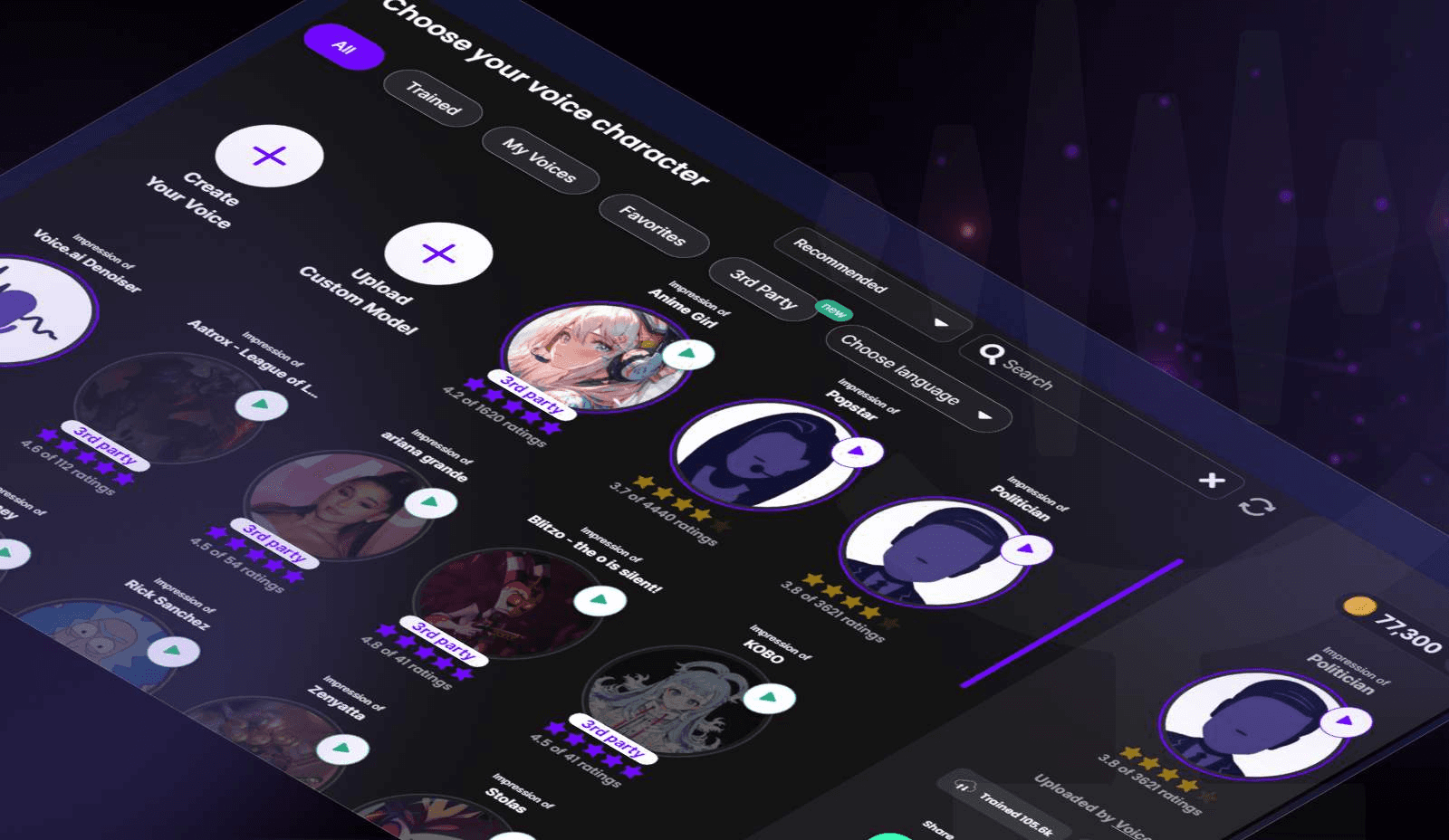
Knowing how to build a character is one skill. Running that process without it collapsing into chaos is another. The failure point most creators hit is not ignorance. It is a sequence. They try to define, test, write, generate, and refine all at once, which means every decision competes with every other decision. The result is not a bad character. It is an unfinished one that gets rebuilt from scratch next week.
Separate the Stages, Protect the Output
The 30-minute workflow works because it treats character creation as a pipeline rather than a brainstorm. Each stage has one job. When you finish that job, you move forward and do not return.
Minutes zero through five exist only for definition.
- Personality
- Role
- Audience
- Communication style
Nothing else. A business mentor who speaks to entrepreneurs needs a different voice profile than a gaming commentator reacting to clips in real time. Deciding which one you are building before touching any tool removes the most expensive kind of confusion: the kind that surfaces at minute twenty-two.
Locking in Consistency
Minutes five through ten build the voice profile. This is where:
- Tone
- Pacing
- Energy level
- Vocabulary
Are locked in. The target is consistency, not realism. A character who sounds slightly synthetic but always sounds like themselves will outperform a character who sounds human one episode and unrecognizable the next.
Why Dialogue Comes Before Audio
Minutes ten through fifteen are for writing sample dialogue, and this step is the one most creators skip. They jump straight to audio generation because it feels like progress. It is not. Dialogue reveals whether the personality actually works before you invest time in production.
- Write introductions
- Reactions
- Short explanations
- Read them aloud
If the voice in your head sounds uncertain or generic, the AI-generated version will too. The character has to exist on the page before it can exist in audio. Minutes fifteen through twenty are for generating short test clips only. Not full scripts. Not complete episodes. Three to five short samples across different delivery styles, compared directly against the voice profile you built in minutes five through ten. This kind of structured 30-minute workflow is realistic for creators who complete the upstream definition work before touching generation tools.
The Documentation Step Most Creators Skip
Minutes twenty through twenty-five are for refinement and locking.
- Review personality consistency, voice fit, and dialogue quality.
- Then write it all down.
- Voice settings, personality traits, communication rules.
This is the step that separates creators who build once from creators who rebuild forever.
A common pattern surfaces here: creators who skip documentation spend more time recreating character profiles than they spend actually producing content. The character exists in their memory, so it drifts whenever they return to it. Documentation is not bureaucracy. It is the mechanism that makes the character portable.
Preventing Character Fragmentation
Most creators handle this by keeping rough notes in a separate document or relying on memory between sessions. That approach works for one or two videos. As output scales to ten or twenty videos per month, the character starts to fragment.
- Voice tone shifts slightly.
- Personality cues disappear.
- The audience notices before the creator does.
Crayo addresses this directly by keeping AI voiceovers within the editing environment, so the character settings travel with the project rather than living in a separate file that gets lost or ignored.
Minutes Twenty-Five Through Thirty: The System, Not the Character
The final five minutes are not about the character. They are about the system that holds the character. Store the complete profile:
- Voice settings
- Sample dialogue
- Personality guidelines
- Communication rules in one place you will actually return to
The goal of this workflow is not to produce one good character voice. It is producing a reusable asset. A creator who saves a complete character system can produce ten videos with the same recognizable voice without rebuilding anything. That compounding effect is where the real-time savings live, not in the generation step itself.
The workflow also protects against a subtler problem: creative drift. When you return to a character after two weeks, the system reverts you to the original version. Without it, you are essentially starting over with a vague memory of what worked.
What the Workflow Actually Removes
The problem was never that AI voice generation takes too long. The tools are fast. The problem was that creation, testing, rewriting, generating, and refining were all happening simultaneously, which means none of them were happening well. Separating those stages into a linear sequence removes the overlap. Each decision gets made once, in the right order, with the right information available. That is what compresses a three-hour session into thirty minutes. Not a faster tool. A cleaner process. And the moment that process becomes a saved system rather than a one-time workflow, something more interesting starts to happen with how you scale it.
Create Character AI Voices Faster With Crayo
The system you have now is the real output. A saved character profile, a structured voice framework, a reusable dialogue template. That is the asset, not the audio file. Most creators treat each new character as a fresh problem to solve, which means they keep paying the same time cost repeatedly. The ones scaling faceless channels are not working harder on each character. They work once and deploy many times.
Crayo fits directly into that logic. Instead of bouncing between a personality doc, a separate voice tool, and an audio editor, Crayo keeps AI voiceovers inside the same environment where your content gets built. You define the character, generate the voice, and produce the clip without switching contexts. That compression is where the real-time savings live, not in generating faster audio, but in eliminating the gaps between steps.