

 Trusted by 3.5+ million users
Best AI clipping tools for gaming clips (2026)
Crayo is the pick for GTA and facecam gameplay clips priced per finished clip, with ten GTA templates and clipping from live Twitch and Kick streams. Eklipse and StreamLadder fit better for a flat monthly price, 60fps exports and posting from the tool, and Clipchamp is the free option if you cut by hand. We compared five tools on layouts, moment finding, sources, export quality and metering. Competitor facts and prices are the ones checked October 8 to 25, 2026 for the other pages in this hub. Nothing was checked again for this page.
5 tools judged on gameplay and facecam layouts, finds the moments for you, where the footage comes from, export quality, what you pay for.
Updated
Crayo publishes this page and sells one of the products compared. Every competitor fact links to its source and carries the date we checked it. Spotted an error? Email support@crayo.ai and we correct it within 48 hours.
The ranking
Crayo is listed first and publishes this page, so the criteria are stated and you can disagree with the order.
- 1
Crayo
Best for gTA and facecam clips priced per clipCrayo publishes this page and sells one of the products listed. Crayo is an AI clipping editor with templates made for gameplay. It has ten GTA templates: five are gameplay plus facecam layouts and five are modelled on popular GTA clip formats, and a face-aware camera follows the streamer. AutoClip turns a long recording into captioned vertical clips, and Live Clipping does the same from a Twitch or Kick stream while it is live, per crayo.ai/features/live-clipping. One workflow credit is one finished clip, Hobby at $29 a month includes 250 credits, and the full timeline editor is on every plan, per crayo.ai/pricing. Best for clippers who cut GTA, GTA RP and other facecam gameplay and keep a few clips from each session. The honest limitation: Live Clipping finds moments from chat, sound and speech, not from in-game events, so quiet gameplay with no commentary gives it less to work with. There is no scheduler and no mobile app, and exports stop at 1080p.
Entry price: Hobby $29/mo, $19/mo billed quarterly, or $199/yr (checked Oct 25, 2026)crayo.ai - 2
Eklipse
Best for automatic highlights from a streamer's own VODsEklipse is built for this job: its homepage calls it an AI clip maker for gamers and streamers that fully automates your highlights. It imports Twitch, Kick and YouTube VODs by OAuth, scans up to 3 streams a day and returns up to 45 clips per output, with virality scoring, AI reframe with manual override, 1000+ premium templates and a Content Publisher, per its help center, blog and compare pages. The help center, updated Apr 12, 2026 and checked Oct 8, 2026, lists Premium at $24.99 a month or $179.99 a year, with exports up to 1080p 60fps and no watermark. Eklipse fits better than Crayo if you stream your own gameplay most days and want every VOD turned into highlights at a flat price, at 60fps, with posting and a phone app. The limitation: there is no public pricing page, the free tier ended in June 2026, its editor is Eklipse Studio, a vertical editor, no public API was found, and refunds are generally not provided per eklipse.gg/refund-policy.
Entry price: Premium $24.99/mo or $14.99/mo billed yearly as $179.99, from the help center; no public pricing page (checked Oct 8, 2026)eklipse.ggRead Crayo vs Eklipse - 3
StreamLadder
Best for a free editor with gameplay and facecam presetsStreamLadder's clip editor is free on every plan and is built around gameplay plus facecam presets and custom layouts, with karaoke, pop-in and typewriter captions in 90+ languages, per its pages. The upgrade page, opened from Canada on Oct 9, 2026, showed Free with 720p 30fps export and a 200 MB upload cap, Starter at CA$21 a month with 1080p 60fps, Creator at CA$37 with unlimited ClipGPT AI clipping of Twitch and Kick VODs, and Pro at CA$53 with 4K 60fps. Posting and scheduling to TikTok, Shorts and Reels start on Starter, and there are iOS and Android apps. StreamLadder fits better than Crayo if you want to lay out clips yourself for free, export at 60fps or 4K, or schedule posts. The limitation: AI clipping starts at Creator and works on VODs only, its pages describe preset layouts and no face tracking, and there is no public API.
Entry price: Creator CA$37/mo is the cheapest plan with AI clipping; Starter CA$21/mo. Canadian prices read in a browser on Oct 9, 2026streamladder.comRead Crayo vs StreamLadder - 4
Klap
Best for per-clip pricing with a gaming reframeKlap is a general AI clipper whose AI Reframe 2 lists gaming alongside split screen and screencast layouts, and it scores each clip's viral potential. Its pricing page, read in a browser on Oct 9, 2026, lists Basic at $29 a month or $14 a month billed yearly for 100 clips from 10 videos of up to 45 minutes each with HD downloads, and Pro at $79 or $39 yearly for 300 clips from 30 videos of up to 2 hours with 4K. Posting to TikTok, YouTube, Instagram and LinkedIn and API access are on every paid plan. Klap fits better than Crayo if you want per-clip pricing with posting built in, or 4K. The limitation for gaming: a session over 45 minutes needs Pro, Basic allows 10 videos a month, the free plan is 1 video, watermarked per a third-party review, and nothing in its data here is specific to facecam layouts.
- 5
Clipchamp
Best for cutting gaming clips by hand for freeClipchamp is a free multi-track editor with a gaming video editor page, and it is the pick if you would rather cut the clip yourself. With a personal Microsoft account it exports up to 1080p with no watermark, no credits and no export cap, per its pricing page checked Oct 8, 2026, and there is a Windows app. Premium adds 4K and is bundled with Microsoft 365 Personal at $9.99 a month or $99.99 a year on microsoft.com. Clipchamp fits better than Crayo if you want a free editor with nothing metered and you already know which moment you want. The limitation: its gaming page shows no automatic highlights and no virality ranking, reframing is a manual crop with aspect presets and no clip layouts, imports are capped at 4 GB each, and there is no public API.
Entry price: Free; Premium comes with Microsoft 365 Personal at $9.99/mo or $99.99/yr on microsoft.com (checked Oct 8, 2026)clipchamp.comRead Crayo vs Clipchamp
Try it on your own video
Paste a YouTube or TikTok link or upload a file. AutoClip, the editor and the API are on every plan.
Every tool in one table
Text values from each vendor's own pages. No review scores.
| Tool | Entry price | Gameplay and facecam layouts | Finds the moments for you | Where the footage comes from | Export quality | What you pay for |
|---|---|---|---|---|---|---|
| 1Crayo | Hobby $29/mo, $19/mo billed quarterly, or $199/yr (checked Oct 25, 2026) | Ten GTA templates, five of them gameplay plus facecam layouts, and a face-aware camera | AutoClip and Find Viral Moments on recordings, Live Clipping on live streams | Live Twitch and Kick streams, YouTube and TikTok links, file uploads | Up to 1080p | 1 credit per finished clip, plus export minutes |
| 2Eklipse | Premium $24.99/mo or $14.99/mo billed yearly as $179.99, from the help center; no public pricing page (checked Oct 8, 2026) | AI reframe with manual override; 1000+ templates, layouts not enumerated | Yes, with virality scoring per its compare table | Twitch, Kick and YouTube VODs by OAuth, and uploads | 1080p 60fps on Premium, no watermark | Flat price; up to 3 streams a day |
| 3StreamLadder | Creator CA$37/mo is the cheapest plan with AI clipping; Starter CA$21/mo. Canadian prices read in a browser on Oct 9, 2026 | Gameplay plus facecam presets and custom layouts; no face tracking described | ClipGPT on Creator and Pro, VOD only, with a virality score | Twitch and Kick VODs by URL; uploads to 2 GB on paid plans | 720p 30fps on Free, 1080p 60fps on Starter and Creator, 4K 60fps on Pro | Plan tier, not credits |
| 4Klap | Basic $29/mo or $14/mo billed yearly (checked Oct 25, 2026) | AI Reframe 2 lists a gaming layout | Yes, scores each clip's viral potential | Videos of 45 minutes to 3 hours by plan; Twitch and Kick import not checked | HD on Basic, 4K on Pro and Pro+ | 1 clip per clip generated, plus a videos per month cap |
| 5Clipchamp | Free; Premium comes with Microsoft 365 Personal at $9.99/mo or $99.99/yr on microsoft.com (checked Oct 8, 2026) | Aspect presets and manual crop only; no clip layouts | No. No auto highlights or ranking | Uploads, 4 GB per import | 1080p on Free, 4K with Microsoft 365 Personal or Family | Nothing is metered |
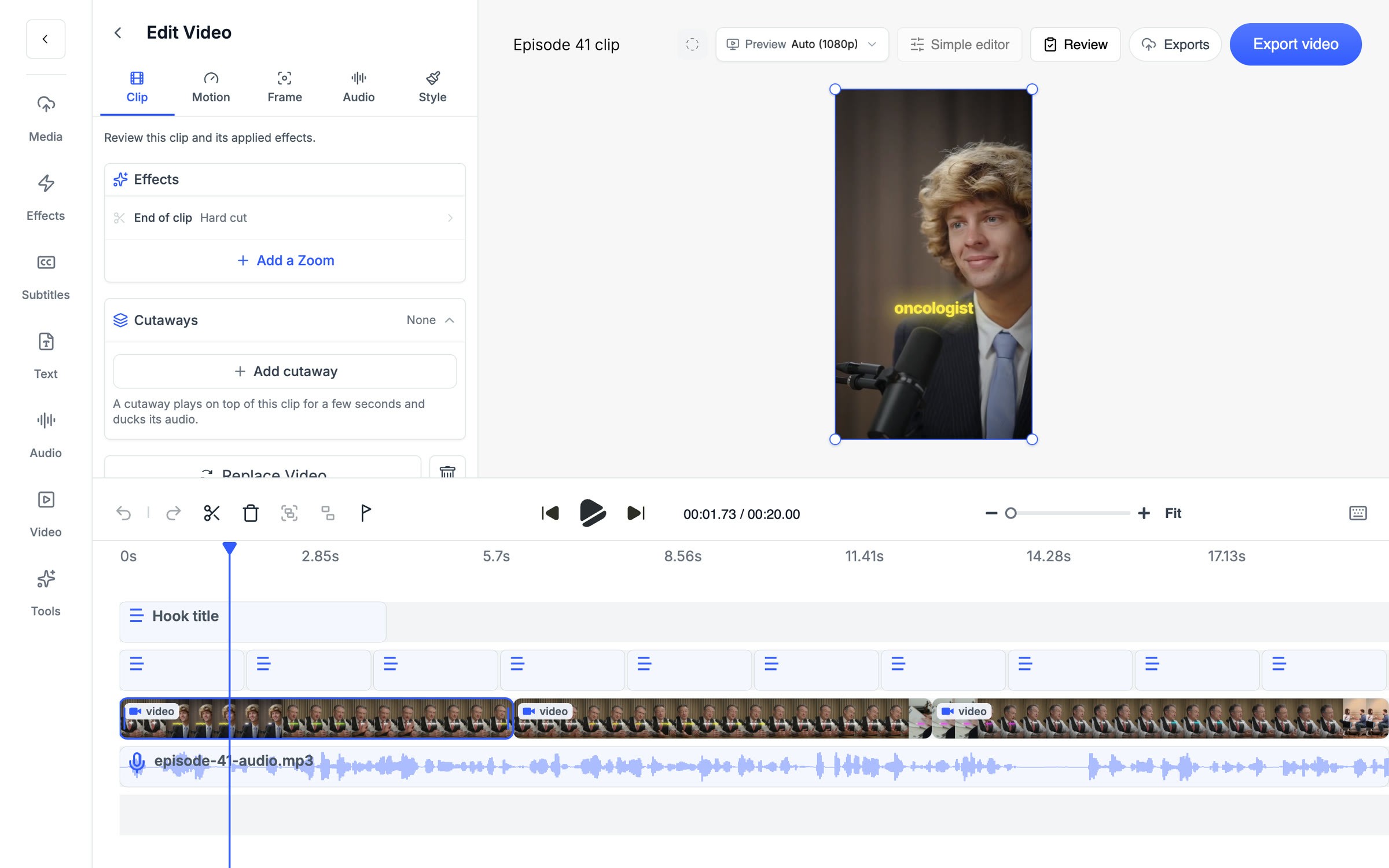
A full video editor. Right in your browser.
Most clipping tools stop at the export. Crayo comes with a real multi-track editor and nothing to download.
Multi-track timeline
Cut, split and rearrange your clip on a real timeline.
Effects
LUTs, zooms, transitions and reframe, built in.
Captions
AI or manual subtitles, styled the way you want.
Cutaways
Drop b-roll over any clip and its audio ducks on its own.
About this page
What changed and when.
- First published. Competitor facts and prices are the ones checked October 8 to 25, 2026 for the other pages in this hub. Nothing was checked again for this page. Crayo Hobby is $29 a month, $57 every 3 months ($19 a month) or $199 a year (about $16.58 a month).
- Wording about Crayo's plans simplified. Only statements about Crayo changed; competitor facts and prices were not re-checked and keep their check dates.
Frequently asked questions
Keep exploring
Crayo vs Eklipse
Crayo vs Eklipse with dated prices. Eklipse Premium is $24.99 a month, capped at 3 streams a day, no free tier since June 2026. Crayo meters per finished clip.
ComparisonCrayo vs StreamLadder
Crayo vs StreamLadder, with dated prices. StreamLadder gates ClipGPT to Creator and imports Twitch and Kick VODs. Crayo clips YouTube links on its entry plan.
ComparisonCrayo vs Klap
Crayo vs Klap with dated prices. Both meter per clip. Klap adds 4K, dubbing and scheduling. Crayo takes 3-hour sources on the entry plan, ranks moments to approve first and puts a timeline editor on every plan.
ComparisonCrayo vs Opus Clip
Crayo vs Opus Clip, with dated prices. Opus Clip charges 1 credit per minute uploaded. Crayo charges 1 credit per finished clip, ranks moments before you cut and puts a timeline editor on every plan.
ComparisonCrayo vs CapCut
Crayo vs CapCut, with dated prices. CapCut has no pricing page; Pro is about $19.99/mo per third-party guides. Crayo publishes every plan and ranks clips.
ComparisonCrayo vs Submagic
Crayo vs Submagic, with dated prices. Submagic caps credits, video count and minutes per video. Crayo charges 1 credit per finished clip, no per-video cap.