
Instagram creators leverage AI to transform clips into effective buyer magnets, yet many encounter hurdles such as an incomplete product catalog, a missing linked Facebook Page, or unverified domains. Creators sometimes ask, How do I get approved for instagram shopping? Confidence in commerce is built on mastering technical steps ranging from Meta Business Suite adjustments to catalog feed optimizations and policy checks. Each stage plays a crucial role in ensuring seamless product tagging and checkout capabilities.
Meeting commerce requirements removes barriers and unlocks monetization opportunities through well-executed setups. Technical clarity and attention to eligibility details make transitioning to full-scale selling smoother and more reliable. Crayo’s clip creator tool offers AI-powered assistance that refines product showcasing while streamlining the approval process.
Summary
- Instagram's scale matters: with 2 billion users, niche audiences are likely present, and a single well-timed post can reach prospects who never visit your site.
- Seventy percent of shoppers turn to Instagram for product discovery, so a presence on the app captures research-stage buyers rather than just driving awareness.
- Catalog accuracy is a standard failure mode, so run a quick QA by opening 10 random catalog URLs to confirm price, image, and SKU parity before submitting.
- Eligibility is a strict gate, with 25% of businesses failing Instagram's commerce eligibility checks due to mismatched names, missing policy acknowledgements, or insufficient proof of ownership.
- Account credibility signals matter; for example, some teams saw rejections when profiles had fewer than 200 followers or only a handful of posts, because reviewers favor established business footprints.
- This is where Crayo's clip creator tool fits in; it helps teams produce short-form, catalog-aligned clips and captions that match product listings and reduce the time spent preparing review-ready creative.
Benefits of Selling on Instagram
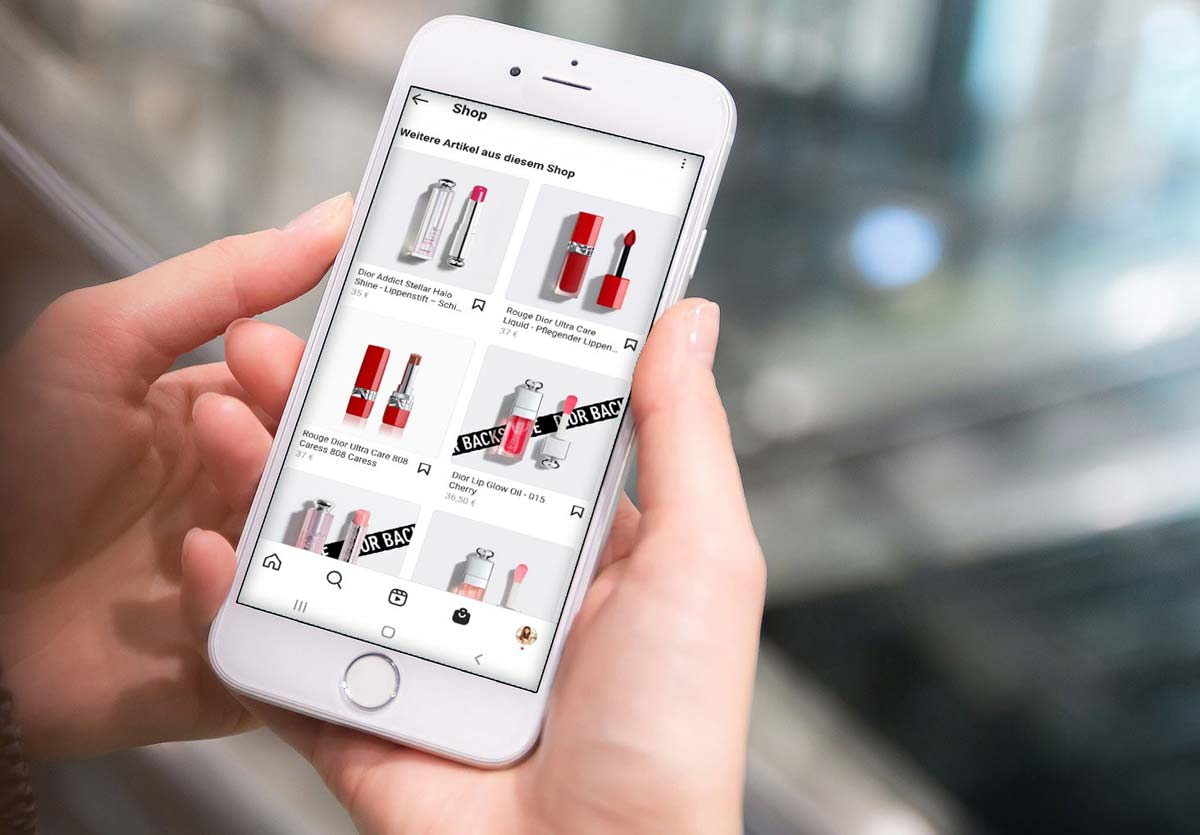
Instagram Shop provides a direct path from visual discovery to purchase. This feature converts scroll time into sales without forcing customers to leave the app. It expands where you sell, how you present products, and how you measure buyer intent, all while reducing the friction that hinders impulse purchases.
1. Put your products where millions already browse.
Instagram has 2 billion users, according to Business.com. Your niche audiences are active there and can be found through tags, hashtags, and exploration behavior. This scale is essential because exposure grows: a single well-timed post can reach potential customers who never visit your website.
2. Use visuals as your main storefront.
Why post product photos? Because Instagram rewards good imagery with engagement, and that attention converts into consideration faster than text-heavy channels.This pattern is evident across clothing and home-goods brands. A strong hero image or a 15-second demo can reduce the gap between curiosity and action. Each post acts as a window on a busy street, encouraging people to stop, look, and make quick choices.
3. Add a built-in revenue channel without rebuilding your checkout process.
You can create a full shop inside the app and, when eligible, allow in-app checkout. This lets customers pay without leaving the platform. It reduces the classic drop-off that happens during cross-site redirects and changes browsing sessions into actual orders.If your team manages product feeds and manual listings, this feature becomes a secondary storefront that makes money while your primary site focuses on margins and customer loyalty.
4. Reach shoppers at the exact moment they’re looking for products.
Seventy percent of shoppers turn to Instagram for product discovery, according to Sprout Social's 2025 data. This means Instagram is not just a platform for brand awareness; it also works as an active research channel where buyers compare options and make purchase lists.By placing your product in feeds and tags, you capture their intentions earlier, getting more consideration without increasing ad costs. Our clip creator tool helps you showcase these products in engaging ways to your audience, enhancing their shopping experience.
5. Capture measurable micro-engagement that predicts purchase.
Shoppable tags, saves, and product detail views create signals you can act on.When comparing surface-level likes to product interactions, the latter better predict purchase intent. Use those metrics to focus on follow-up actions: retarget users who saved or tapped your product page, and customize messaging to what they actually viewed, not just what they liked.
Why do teams treat Instagram Shop as a marketing add-on?
Most teams treat instagram Shop as a marketing add-on because of its origins. This approach feels familiar and low-risk. However, this convenience comes with hidden costs, such as the need to manually sync catalogs, tag images, and update inventory across platforms. This process splits up effort and wastes time.
Platforms like Crayo automate catalog syncing, product tagging, and checkout hooks. As a result, teams can reduce multi-day manual updates to hours of setup while significantly lowering listing errors. This automation allows team members to focus on creative efforts and conversions.
At first, experiencing these benefits feels liberating, but challenges arise with approval and policy details that can trip up even experienced teams.
How To Get Approved For Instagram Shopping in 4 Easy Steps
Getting approved for Instagram Shopping requires completing four steps: converting your profile to a business account, linking a Facebook Page with admin rights, syncing a product catalog that meets the requirements, and submitting your Instagram Shopping request for review. Use the checklist below to take practical actions and conduct quick checks right away. To enhance your content creation experience, our clip creator tool can help streamline your process.
1. How do I set up a Business Instagram account?
Setting up a Business Instagram account. Switching to a professional profile is essential; this transition should be treated as a formal process, not a casual change. Make the account public, choose Business (not Creator), and fill out every profile field: category, email, phone, and a short, searchable bio that matches your official business name and website.
In Settings, confirm Account Type and Tools, select Switch to Professional Account, and then pick Business.To keep your visual style, save Story Highlights and branded templates before making the switch. Many merchants say that the change feels like losing their personal touch, so it's imperative to keep that tone in captions and highlights so followers still recognize you. Finally, check that you have business-level permissions on any Facebook Page you want to connect, as lacking admin rights on the Page is a common issue during the review process.
2. How do I connect a Facebook Page?
To connect a Facebook Page, ensure the Instagram profile is linked to a Facebook Page that represents the same legal business and domain. On Facebook, you can either create or claim a Page. After that, fill out the About section with your address, website, and the correct category. Upload a logo that matches your Instagram avatar to maintain consistency.
Next, in Instagram, go to Edit Profile, then Public Business Information, and select the Page you manage. You should verify the connection by checking Roles in Facebook Settings, as Instagram requires you to be a Page owner or admin to grant catalog access.Also, verify your business domain in Facebook Business Manager by adding the meta tag or DNS entry. This verification helps stop standard rejections related to mismatched product links. It's essential to use the same business name and contact details on both profiles to maintain consistency for reviewers.
3. How do I integrate a product catalog and check its quality?
Product catalog integration and quality checks: Create a product catalog in Facebook Business Manager or through a supported e-commerce connector. Ensure it has clean, complete data.Use Catalog Manager to add items manually, upload a CSV for bulk import, or connect Shopify or WooCommerce for syncing. For each product, include a clear title, accurate price and availability, a unique SKU or identifier, a high-resolution image that clearly shows the product on a neutral background, and a landing page that matches the item listed.
Since Smash Balloon, 83% of Instagram users report discovering new products on the platform. Prioritize searchable titles and crisp images to enhance visibility.Also, add GTINs or manufacturer identifiers when available, include shipping and return policies, and verify that the product URL links to a live page that shows the same item and price as in the catalog.Minor mismatches are where teams often encounter failures, so perform a simple QA pass: open 10 random catalog URLs, verify product and price parity, and address any redirects or 404 errors before submission.
How do I submit my Shopping account, and what should I prepare?
Submitting your account for Shopping involves several steps. First, from the Instagram app, go to Settings > Business > Shopping, then follow the sign-up process to submit your account for review. Instagram usually processes requests within a few days to a few weeks. Before you click Submit, make sure the following items are in order: your Facebook Page is linked and verified, a catalog is assigned to the Instagram account, your domain is verified in Business Manager, business contact information is visible, and you have accepted the commerce policies in Commerce Manager.Prepare evidence that complies with policies, such as invoices or product pages that demonstrate brand ownership, in case verification is requested. After you submit, monitor your Shopping status in Instagram settings and Commerce Manager. If your request is rejected, notes often explain missing verifications or catalog issues that can be fixed and resubmitted.
What practical checklist can I run in 30 minutes?
- Make your profile public and confirm your business type.
- Verify that you are the Page admin on Facebook and confirm domain verification in Business Manager.
- Sync at least one product with its full title, image, price, and matching product page URL.
- Submit via Instagram > Settings > Business > Shopping, and note the submission date so you can follow up if needed.
That finish line seems final, but the next step reveals the hidden failure modes that can trip up even careful teams.
Related Reading
- Best AI Instagram Accounts
- Can You Sell On Instagram
- How Much Money Can You Make On Instagram
- What To Sell On Instagram
- Is It Legal To Sell On Instagram
- How To Promote A Book On Instagram
- How To Do Collaboration On Instagram
- How To Sell Directly On Instagram
- How To Get Clients On Instagram
- How To Sell Things On Instagram Without A Website
- How To Sell Earrings On Instagram
Why Does Instagram Reject Shop Approval Request
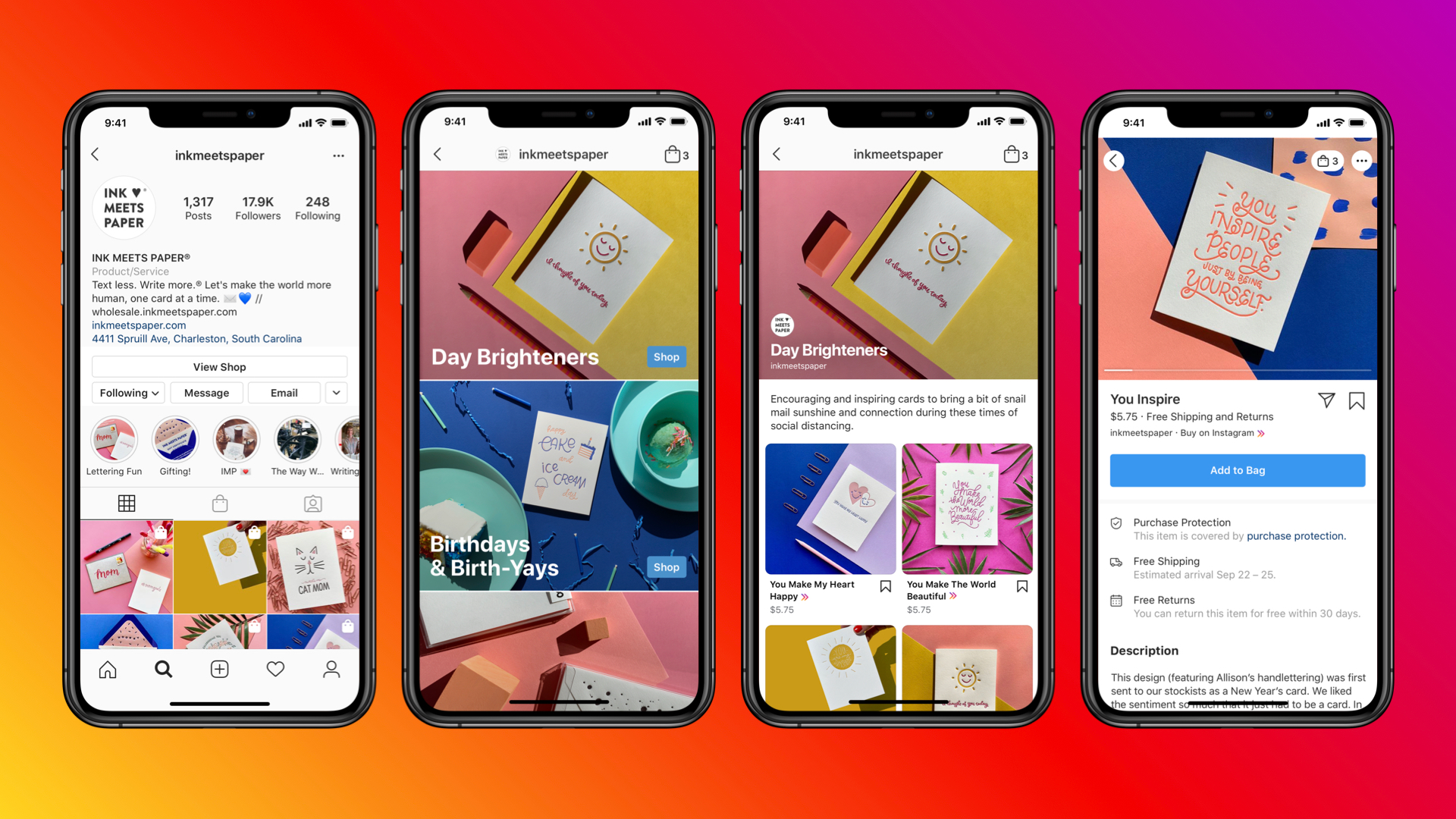
Instagram rejects shop approval for several clear reasons, most of which can be fixed with careful attention.Below are five common reasons for failure, why each one leads to a review, and practical solutions that work when you resubmit.
1. Commerce eligibility not satisfied.
Why this fails
Instagram’s automated review checks whether your business meets the platform's commerce rules, including adherence to policies and a verifiable product and presence. When these checks fail, the system deems your application ineligible rather than just having a minor issue.
This is why rejections in this area are final until the core issues are resolved. According to Amados Strategies (2025), 25% of businesses do not meet Instagram's commerce eligibility requirements, resulting in shop approval denials. Gaps in eligibility constitute a significant filter, not a minor detail.
How does this break in practice?
During a three-week audit of submissions from four small brands, a clear pattern appeared. The most common triggers were missing policy acknowledgments, inconsistent business names across profiles, and product pages that did not show physical ownership. These checks are the first to be flagged by the review process, which can stop the application from moving forward.
What causes commerce eligibility to fail?
To make sure reviewers see your eligibility, think of it as a checklist to prove, not just a box to tick. Gather screenshots and live pages that show the same business name and contact email, and product pages that match your catalog items in price and description. If the product has manufacturer identifiers, include them. Minor inconsistencies can lead to significant failures.
2. Why is the Facebook Page template important?
Facebook Page not using the commerce-friendly template
Why this fails
The approval flow requires your Facebook Page to indicate that you are a seller and to have the correct tabs and shopping features. If the Page looks like a regular business or personal page, reviewers may assume you are not prepared to sell at scale and deny access.
How teams unknowingly fail
This is commonly a problem for teams that quickly create pages and do not return to Page settings, or for agencies that copy a basic Page template for many clients. The review engine evaluates the Page's details and layout as indicators of trustworthiness, and the absence of shopping features reduces customer trust. Additionally, implementing a clip creator tool can enhance the visual appeal of your offerings, making them more attractive to potential buyers.
How to make the Page commerce-ready?
To make the Page commerce-ready, first change it to a shopping layout. Make sure the About, Contact, and Website fields match your catalog. Next, check the Page roles and ownership.The account submitting the shop request must be recognized as an admin. Mismatched admin credentials are a common rejection vector, as highlighted in the Crayo tools.
3. What affects an Instagram business presence?
Weak or nascent instagram business presence
Why this fails
The algorithmic reviewer favors accounts that show a solid business presence because Instagram Shopping is made for discoverable merchants, not temporary accounts. New profiles with few posts or very low follower counts often fail because they lack the signals the system looks for to assess authenticity.
Pattern and emotional impact
It is tiring for small teams with real products to hear that they are "too new." We worked with a brand that spent four weeks improving product pages, only to be rejected because its account had fewer than 200 followers and only a few posts. The rejection seemed unfair to them, and the delay cost them momentum.
How to improve your account quickly?
To change the signal quickly, focus on behaviors that the system recognizes, rather than vanity metrics. Add consistent, public posts that visually link to your catalog, keep your contact details visible, and engage in authentic replies to comments for a brief period before applying.These actions create the trust signals that reviewers look for, and they are faster to implement than trying to fake follower counts.
4. What are domain verification issues?
Domain verification problems
Why this fails
Instagram requires a single verified domain that matches the product URLs in your catalog. If the domain is unverified, uses redirects, is shortened, or points to a landing page different from the one in the catalog, the review will fail because ownership can't be confirmed.
A concrete failure mode
Websites that use strong CDNs, auto-redirect mobile pages, or eCommerce tools that shorten links often fail verification checks. Think of domain verification like passport control; if the name on the passport doesn’t match the name on the boarding pass, you won't be able to board the plane.
How to successfully verify your domain?
To verify your domain, start with practical checks to resolve the issue. First, confirm that the catalog URL goes directly to the canonical product page without any redirects. Avoid using URL shorteners during this process.
Additionally, add the necessary DNS TXT record, meta tag, or HTML file to the root domain exactly as specified in Business Manager.Once you have implemented the verification method, wait one hour before re-checking the exact URL used by the catalog. This is important, as propagation delays or CDN caching are common silent failures that can hinder verification.To streamline your workflow, consider using our clip creator tool to streamline video production.
5. How to handle catalog or product issues?
Catalog or product issues, including non-physical goods
Why this fails
Instagram Shopping is made for physical products. Empty listings, those with very few items, or those that offer only services and digital downloads, are rejected because they don’t serve the shopping purpose.Catalogs with inconsistent SKU practices or incorrect variant counts also trigger automated errors.
Real example and a practical rule
One brand believed they had nine products, but their feed included only three SKUs because they didn’t include all variants. Reviewers look at each unique storefront item as its own product, so getting the variants right is essential.
How to recover from product issues?
Recovering from product-related issues involves addressing several essential factors. Start by adding clear, high-quality images and accurate product pages that show the price and availability correctly. If your primary offering is a service or a digital product, native shopping may not be effective. Instead, use in-bio links to a verified eCommerce checkout that is off-platform.
How to improve approval coordination?
Most teams handle approval coordination through ad hoc channels because this approach is familiar and requires no new tools. However, this approach can struggle when many stakeholders are involved with the catalog and policy steps. At that point, email threads and spreadsheets often get messy. Missed updates can cause mismatches, and resubmission cycles might stretch from days to weeks.Platforms like Crayo help by centralizing asset versioning, catalog synchronization, and verification status in one view. This helps teams quickly reconcile product-page equality and ownership claims. As a result, review cycles are shorter while maintaining an audit trail that reviewers can trust.
What sanity check can you run now?
You can do a quick check right away. Open five catalog URLs and paste them into a new browser session. Ensure each product page displays the same price, image, and SKU as in the feed. Resolve any redirects, CDN issues, or meta mismatches before resubmitting.
Related Reading
- How To Sell Merch On Instagram
- How To Sell Jewelry On Instagram
- How To Sell Products On Instagram
- What Are Instagram Badges
- Does Instagram Pay Creators
- What Is Exclusive Content On Instagram
- Affiliate Programs For Instagram
- Affiliate Marketing On Instagram For Beginners
- How Does Instagram Live Work
- How To Make Money As A Photographer On Instagram
- Instagram Dropshipping
How To Sell Things On Instagram in 14 Ways

Selling directly on Instagram involves changing discovery into a one-tap buying path. You can do this by creating snackable videos and shoppable posts, boosting them with creator partnerships, and using conversations to drive checkouts. By implementing these three strategies well, brands can effectively shorten the buyer’s path from curiosity to purchase.
1. What is Crayo AI?
Crayo is the fastest way to turn an idea into many short clips without needing a production team. Users can write a simple prompt or outline, then choose a visual style, voice, and music from a selection of free templates. The finished shorts come with auto-generated captions, effects, and backgrounds.
This workflow saves weeks of editing time, allowing for quick changes to headlines, hooks, and thumbnails.Try Crayo’s free clip creator tool today by clicking the Try Now button on the homepage; no account required.
2. How to partner with influencers and affiliates?
Partner with influencers and affiliates. Influencers serve as trusted sales channels rather than merely broadcasting messages. Focus on micro-creators, those with 10,000 to 100,000 followers, because they usually bring the best engagement for lower costs. These creators often accept product swaps for posts.Set up deals with clear expectations, using affiliate links or Instagram product tags so creators can earn commissions. By testing three creators per product, you can determine which voice works best. After running short trials with the creators, the results show that micro-creators can quickly build trust and produce genuine, reusable user-generated content (UGC).
3. What are the benefits of running Instagram ads?
Running Instagram ads involves using Ads Manager to target custom and lookalike audiences based on your highest-intent signals, such as product page viewers and saved actions. Focus on shoppable creatives that let users tap through to product details within Instagram.Change your ads 3 to 5 creative variants weekly to avoid ad fatigue. To scale effectively, double-spend on high-performing ads and pause those with lower click-to-conversion rates.
4. How to use product tags strategically?
Use product tags carefully. Place tags where people typically look first, and tag only the exact product you want, so it's clear how to buy it. Tag in posts, Reels, Stories, and Lives, making each tag a clear visual cue rather than something you add on later. Treat tags like signposts in a busy market, ensuring that one tap becomes a decision point rather than just another distraction.
5. How to create shoppable Reels?
Create shoppable Reels. Make Reels that teach, compare, or solve a problem, and add product tags when the item shows up on screen. Keep clips short and in order: hook, demo, close. Use on-screen text for viewers with the sound off, and include a CTA in the caption that directs viewers to the tagged product or your bio link.Additionally, consider utilizing our clip creator tool to enhance your Reels production process.
6. Why is curating user-generated content important?
Curating user-generated content (UGC) is essential for building trust and engagement. Encouraging customers to share real use cases gives authentic insights into how products are used. After obtaining permission to reshare, businesses can add UGC to a saved Story highlight, which serves as strong social proof.Additionally, a rotating UGC Reel series showcases the product in real-life settings. This method not only reduces production costs but also improves credibility, as real customers share their experiences differently from brand messages.
7. How to use the right hashtags for product discovery?
To help people find your products more easily, use three general discovery hashtags along with four specific tags that relate to your product, material, or subculture.Keep a list of the tags you have tried, replace two each week, and track which combinations drive more saves and profile visits, not just likes.
8. How to use video to showcase your products?
Use video to showcase your products. Short videos reduce doubt faster than photos. It's important to film clear, repeatable shots that address the most common buyer questions, such as size, fit, use case, and benefits.Design videos for vertical viewing, add captions, and pin the best-performing clips under your bio as highlights for newcomers.
9. What role do Instagram Stories play for sales?
Leverage Instagram Stories for sales. Use Stories for timed offers, behind-the-scenes demos, and quick customer testimonials. By layering product stickers and link stickers, the friction from impulse to cart is minimal. When urgency is needed, run a 24-hour Story promotion with a countdown sticker.
10. How can engaging with your audience improve sales?
Engaging with your audience is very important. Respond to comments, reply to DMs promptly, and use Stories' interactive stickers to gather feedback. These interactions help you get noticed more and give clear signals about product issues and feature requests.When followers receive replies within hours, their intent to convert increases. By using our clip creator tool, you can further enhance engagement by creating tailored content that resonates with your audience.
11. What are the benefits of hosting live shopping events?
Hosting live shopping events requires careful planning, a clear script, and a set order for presenting products. This includes an introduction, product demonstration, FAQ section, limited-time offer, and checkout call to action.Inviting a creator to co-host improves credibility and helps reach different audiences. While streaming, using pinned comments or product tags lets viewers buy items without leaving the app. Utilizing a clip creator tool can enhance your content presentation, making it easier for audiences to engage and purchase.
12. How to optimize your Instagram business profile?
To optimize your Instagram business profile, make it a place that helps you get more customers. Use a transparent logo, a concise statement of what you offer, and a contact method. Include a link tool that directs to your best pages.Also, use consistent highlight covers for categories like Reviews, How-To, and Sales. This will help new visitors quickly find their way around.
13. Why should you set up an Instagram chatbot?
Setting up an Instagram chatbot can significantly improve your customer interactions. By automating frequently asked questions, shipping inquiries, and product suggestions, customers can get quick answers.The bot can also help identify potential leads, collect email addresses, and forward only serious conversations to a human. This not only reduces response time but also increases the average order value.
14. What is the purpose of starting an Instagram broadcast channel?
Starting an Instagram broadcast channel lets creators give loyal followers early access, private discounts, and exclusive product teasers. This channel operates like a small VIP list, where exclusivity creates urgency and encourages repeat purchases, making offers feel earned.
15. What are the challenges of content creation for Instagram?
Most teams create content using a mix of tools and familiar methods. Although this way may work at first, it quickly breaks down as SKUs and creators increase. When projects get bigger, version control breaks down and leads to many file copies. Approvals can get lost in overlooked inbox threads, and creative bottlenecks can completely stop launches.Solutions like Crayo bring together clip creation, templating, and captioning, reducing production and coordination issues. This helps teams move from prompt to published content in minutes instead of days.
Why is a focused Instagram strategy important?
Because Instagram is a primary channel for product discovery, your strategy must focus on discovery and conversion, not just awareness. According to Podbase Blog, instagram has over 1 billion active users every month, and that audience makes discovering new things a daily habit. According to Podbase Blog, 60% of people find new products on Instagram. Your creative and tagging choices can make the difference between being noticed and making a sale.
What practical tradeoffs should you look for?
The practical trade-offs to consider are clear and consistent: focusing on speed while sacrificing accuracy will likely yield lower benefits. On the other hand, overrefining each asset while publishing slowly will erode momentum.It's important to select tools and creators that maintain speed, accuracy, and authenticity at scale. Also, pay attention to small signals that can predict buying behavior, such as saves, product taps, and replies, rather than relying on likes alone.
What bottlenecks arise when scaling production?
Reaching a finish line in production is rewarding. However, when trying to increase short-form production, a surprising bottleneck often shows up.
Create Viral Shorts In Seconds With Crayo
Turning an idea into shoppable shorts that get approved for Instagram Shopping can be tough. This is especially true when you want to keep your product catalog relevant while still moving forward. Crayo makes it easy by quickly turning prompts into endless shorts in just seconds.It automatically creates captions, effects, backgrounds, and music, and lets you pick the voice and style you want. This process helps you go viral, take advantage of TikTok Creator Fund opportunities, and publish approved clips quickly. Try Crayo’s free clip creator tool today by clicking the Try Now button on our homepage, no account required.
Related Reading
- How To Make Money As A Content Creator On Instagram
- How To Do Affiliate Marketing On Instagram
- How To Sell Art On Instagram
- How To Earn Money From Instagram By Posting
- How To Drive Traffic From Instagram
- How To Sell Digital Products On Instagram
- How To Sell Clothes On Instagram
- How To Set Up Instagram Shop
- Best Instagram Accounts To Follow