
How To Set Up an Instagram Shop in 5 Quick Steps
Creating a shop on Instagram bridges the gap between discovery and purchase by enabling businesses and creators to tag products directly in their posts. Integrating product catalogs, managing shop tabs, and syncing with Facebook Business Manager may seem complex, prompting the question, How do I set up an instagram shop? Creators, including those recognized as among the best AI Instagram accounts, can transform their profiles into dynamic storefronts that drive both engagement and sales.
A smooth setup enhances visibility while streamlining the buying experience for followers. Optimizing product feeds and checkout settings connects eye-catching content to effortless transactions. Crayo’s clip creator tool simplifies content creation by transforming raw clips into engaging reels that naturally incorporate product tags.
Summary
- Shoppable content has a built-in audience advantage, since 80% of Instagram users follow at least one business account, making tagged posts a high-value discovery channel.
- Product tags and mobile product detail pages matter because over 130 million Instagram users tap on shopping posts every month, so each tag can directly feed purchase intent.
- Eligibility is broad but competitive, with roughly 70% of users eligible to open shops and over 1 million businesses already using Instagram Shop, which means compliance and completeness matter more than follower count.
- Getting a Shop live is straightforward when you follow the checklist, since you can complete the setup in five concrete actions: switch to a professional account, link Facebook and Commerce Manager, build a catalog, submit for review, then activate shopping.
- Relying on manual links and fragmented metadata does not scale; it commonly wastes weeks in rework, whereas centralizing validation and sync compresses error-prone publish cycles from days into hours.
- Content consistency and cadence drive conversion, and the guide’s 11 tactical steps emphasize batching, repurposing, and simple capture backups to avoid missed shoots and unpredictable posting.
- This is where Crayo's clip creator tool fits in; it turns raw clips into concise Reels and TikToks and automates adding product tags so teams can keep content consistent and catalogs synchronized.
Key features of Instagram Shop

Instagram Shop is a set of tools that changes an Instagram presence into a direct sales channel. It lets users tag items, show full product pages, and complete purchases without leaving the app in supported regions. This tool combines product tagging across the feed, Reels, and Stories.It offers dedicated product pages, a customizable storefront, and optional in-app checkout to make the journey from discovery to purchase easier. Our clip creator tool can enhance your visual storytelling, turning your content into a more effective sales channel.
What are the core components of Instagram Shop?
1. Shoppable posts and stories
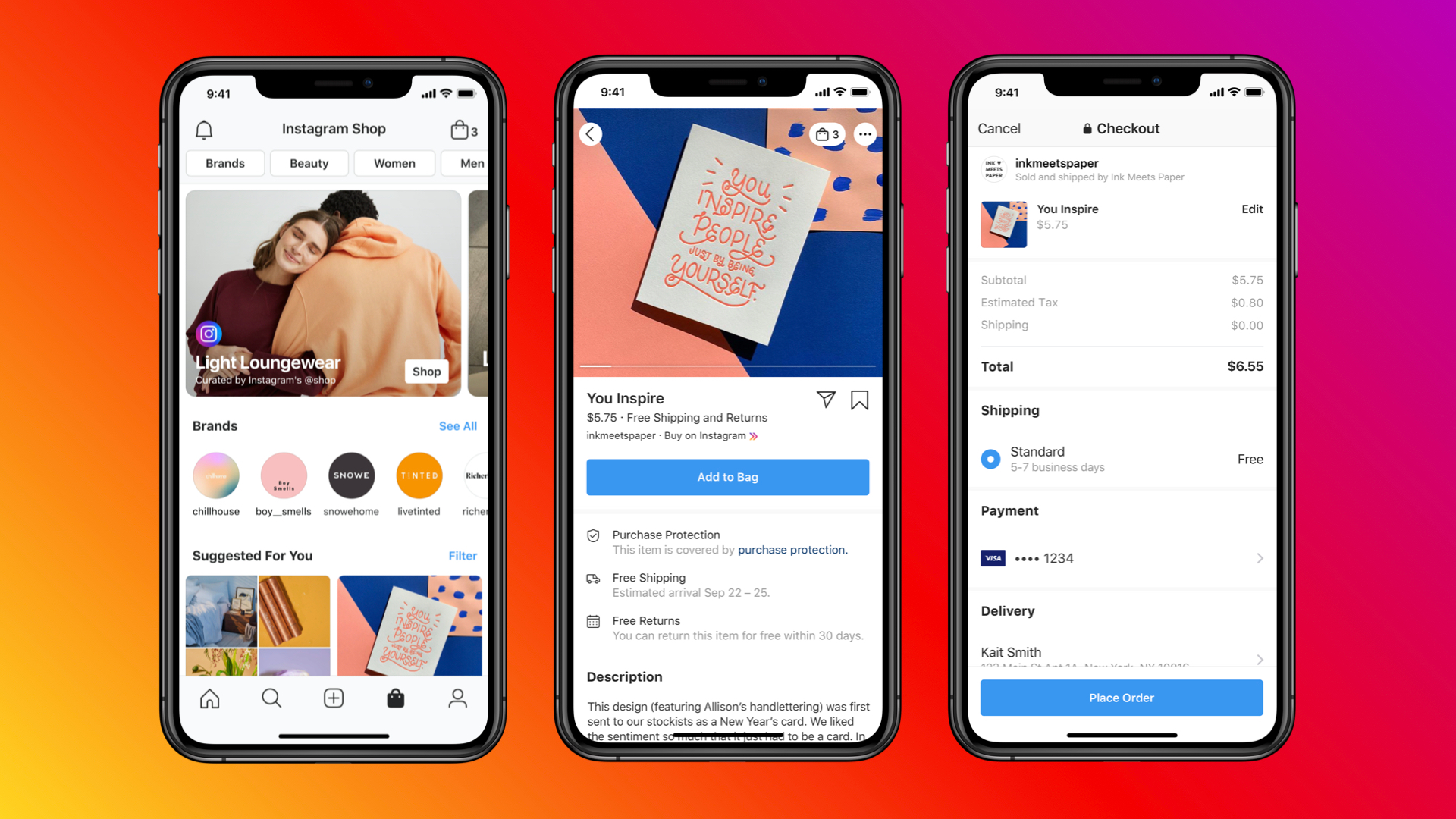
Product tags can be added to feed posts, Reels, and Stories. Viewers can tap a tag to instantly see the product. This tap-to-view flow turns any content into a live storefront, allowing visual storytelling to serve as a direct link to product pages and, ultimately, the checkout.
2. Product detail pages (PDPs)
Each tagged item opens its own product page with pricing, descriptions, variants, and links back to your site or checkout. These pages function as mini product pages designed for mobile, featuring clear images, concise benefits, and an easy button to buy or learn more.
3. Customizable shopfront
You control which collections and how your Shop tab looks. This allows you to highlight seasonal items, best-sellers, or special bundles that show your brand. This setup is important: what customers see first is shaped by the layout and collections, making curation highly impactful on conversions and perceived value.
4. Instagram Checkout (where available)
In some markets, users can complete their purchases within Instagram without leaving the app. This reduces steps and minimizes abandoned carts. When in-app checkout is enabled, it makes buying easier and reduces the friction that can slow impulse purchases.
Most teams connect products by pasting links into captions. This method may feel cheap and immediate, and it initially works well.However, as catalogs grow, manual linking breaks inventory, slows updates, and causes pricing mismatches across posts. These problems quietly cost conversions and waste valuable creative time.
Solutions like Crayo centralize product tagging, automate feed and metadata updates, and keep inventory in sync across platform touchpoints.This approach reduces manual reconciliation and shortens publish cycles from days to hours.
How does Instagram Shop help businesses grow?
1. Increased discoverability
Instagram’s content engine rewards engagement. Having shoppable content places products inside users’ browsing flows, allowing them to discover brands easily. Since the Elfsight Blog, 2024, reports that 80% of Instagram users follow at least one business account, the platform helps users find businesses. Your task is to make sure that this discovery is shoppable.
2. Enhanced customer engagement
Showcasing products in use and answering questions in comments helps build a community around your brand. Adding direct messages for personalized follow-up makes browsing an interactive chat instead of just a catalog. This is where storytelling and quick responses change casual interest into repeat buyers.
3. Smooth Facebook Shops integration
Instagram Shop uses the same catalog and Commerce Manager as Facebook. This means your inventory, pricing, and product details are all in one place, which lowers the chance of listing mistakes. This consistency allows you to run campaigns across both apps without needing to rebuild your assets.
4. Actionable insights and optimization
Instagram gives you metrics on product taps, saves, and purchases. These insights show which creatives help users find products and which ones do not work as well. Use this data to improve product titles, change images, or reorganize collections. Small updates to product detail pages (PDPs) and tags can often lead to noticeable increases in sales.
What happens if teams neglect tagging and analytics?
When teams ignore structured tagging and analytics, they exchange quick wins for lasting disorder. This trend is clear in small DTC brands and agency-managed catalogs, where early success falls apart as they grow. A united approach is key; tagging, inventory sync, and analytics need to be centralized and automated.
Even though this setup might look simple, the next part, who can really open a store and under what conditions, changes everything we talked about. This point is usually trickier than people think.
Eligibility of Instagram Shop
Eligibility for Instagram Shop comes down to compliance and an active presence, not follower count or company size. If you sell allowed physical goods, keep your profile complete and follow commerce rules.Instagram can approve shops for sole proprietors and small brands just as easily as for established retailers. Our clip creator tool can help you create engaging content that stands out in the marketplace.
Many small DTC brands and solo sellers have a common misunderstanding: they often think a large audience or formal corporate structure is needed. In reality, the actual gatekeepers are the rules and activity. For context, EmbedSocial (2024) reports that 70% of Instagram users are eligible to use Instagram Shop, showing that eligibility is widely available instead of exclusive. Furthermore, EmbedSocial (2024) notes that over 1 million businesses are using Instagram Shop.Therefore, setting up correctly enables entry into a crowded yet reachable marketplace: the key is to fulfill the checklist.
1. Clear adherence to commerce rules is very important.
This is the starting point. Your store must sell items that Instagram allows, and every listing, return policy, and transaction process must follow the platform’s merchant and commerce standards.You can think of the rules as a safety check for products: they are not concerned with your size; they only ensure that your products and descriptions meet the requirements. Additionally, you must quickly resolve any policy flags.
2. Transparent business representation is necessary.
Your account and any linked Facebook Page must honestly show who you are and where customers will do business with you. This means you need consistent branding, an accurate way for the public to contact you, and product pages or partner catalog links that match the domain or platform you actually use. Inconsistencies can delay reviews because they raise authenticity red flags for the review team.
3. Operating from a supported country or region is needed.
If your commerce account’s country is outside Instagram's supported list, Shop features will not be available, regardless of how neat your profile is.This is a technical issue, not a judgment on your business. Check the supported regions before investing significant time in building catalogs or tagging products.
4. Demonstrable trust and authenticity.
This usually means having a Business or Creator account with complete profile details, regular content updates, and a clean policy history.The most common issue I see is accounts that appear abandoned or partially set up; reviewers view this as a risk, and access will be limited until the account shows regular, genuine activity.
5. Complete and correct business data is very important.
Every detail counts: up-to-date contact information, fair pricing and stock status, clear shipping terms, and accurate product descriptions are crucial.Missing or misleading information can slow down the review process and increase the risk of removal later. Treat your product metadata as legal documents, as reviewers rely on it to verify legitimacy.
What happens if you don't follow the guidelines?
Many teams simply set up catalogs and hope for the best because this approach feels familiar and quick. However, the hidden cost includes repeated rejections and scattered fixes, which can waste weeks as teams fix metadata and chase review notes.Platforms like Crayo offer catalog validation, automated syncing with approved commerce partners, and policy-checking tools that flag problematic listings before submission. This helps teams turn manual troubleshooting into one-click compliance and greatly reduces review cycles.
This pattern recurs when sellers attempt to take shortcuts by using incomplete profiles or mismatched URLs. Such actions lead to frustration and can be avoided by adding checks to the publishing flow rather than dealing with them later.
One important eligibility detail is often overlooked, which can either make the setup process easy or slow it down.You'll want to see that next.
Related Reading
- Best AI Instagram Accounts
- Can You Sell On Instagram
- How Much Money Can You Make On Instagram
- What To Sell On Instagram
- Is It Legal To Sell On Instagram
- How To Promote A Book On Instagram
- How To Do Collaboration On Instagram
- How To Sell Directly On Instagram
- How To Get Clients On Instagram
- How To Get Approved For Instagram Shopping
- How To Sell Things On Instagram Without A Website
- How To Sell Earrings On Instagram
How To Set Up Instagram Shop in 5 Quick Steps

You can get an Instagram Shop live by taking five clear steps: switch to a professional account, connect the right Facebook assets and Commerce Manager, create a quality product catalog, submit for review, and then activate shopping and start tagging.Following the checklist below will help you avoid usual review delays and metadata headaches.
1. Convert to a Business or Creator account.
- Why this matters: A professional account unlocks merchant tools, analytics, and the shopping workflow.
- How to do it: Open your profile, tap the three lines, choose Settings, then Account, and pick Switch to Professional Account. Select Business or Creator based on whether you need full commerce controls or creator-focused features
- Finish the profile: Choose an accurate category, add an email or phone number for customers to contact you, and include a short bio that matches the legal or domain name you will use for checkout. Keeping this consistent helps to make the review process easier.
- Quick tip: Choose Business if you plan to run ads or need Commerce Manager control; select Creator if your main focus is on discovery and you want creator features without Commerce Manager ownership.
2. Link your Facebook Page and set up Commerce Manager.
- What you need to do: connect the Instagram profile to the Facebook Page that will own the catalog, and then create a Commerce Account in Facebook’s Commerce Manager. Key points to consider include the following:
- Permissions and roles: Ensure the Facebook Page has an assigned admin, and that the person connecting to Commerce Manager has Business Manager admin rights. Mismatched roles often cause technical rejections.
- Pixel and domain steps: Claim your domain and install the Facebook pixel if you plan to track conversions or use in-app checkout. Claiming the domain in Business Manager also prevents later disallowed redirect flags.
- Practical sequence: Create or confirm your Page, go to business.facebook.com/commerce, select Get Started, and follow the prompts to link your Page and Instagram handle.
3. Build and upload a clean product catalog
- How to structure it: use one clear source of truth, either a manual Commerce Manager feed for small inventories or a connection with Shopify, WooCommerce, or another supported platform for automated syncs.
- Required fields and formats: include SKU, title, clear description, one main image per variant, price, availability, and, if available, GTIN or MPN for credibility. For automated feeds, use CSV, XML, or platform connector options and map attributes consistently.
- Image and metadata standards: use mobile-first images, name files with SKUs, and add brief, benefit-focused descriptions. Include inventory at the variant level and clear shipping rules.
- Sync cadence and error handling: schedule daily or real-time syncs for dynamic inventories. If your listings keep failing validation, check for mismatched prices, missing images, or conflicting domains in the product URLs.
- Why this matters for discovery: tagging is important because 70% of shopping enthusiasts turn to Instagram for product discovery (Instagram, 2025). Treat the catalog like your most visible retail shelf.
4. Submit your commerce account for review and prepare for common rejections
- How to submit: In the Instagram app, go to Settings > Business> Shopping, then follow the prompts to submit the account and select the catalog you attached.
- What reviewers check: product metadata consistency, permitted product types, accurate contact and return policies, and ownership of the linked domain or Page.
- Common failures and fixes: mismatches between product URLs and the claimed domain, incomplete profile contact information, and images that violate commerce rules. If rejected, fix the listed fields and resubmit rather than repeatedly reuploading the whole catalog.
- Timeline and verification: reviews are often completed within a few days, but can take longer; track status in the Shopping setting and plan content schedules accordingly.
- Practical safeguard: publish a private test post tagging a non-promotional item to verify the tag flow before pushing major campaigns.
5. Turn on shopping features and tag products across formats
- How to enable tags: after approval, return to Settings, Business, Shopping, select your catalog, and you get product tagging in posts, Stories, and Reels.
- Tagging best practices: tag products naturally, avoid over-tagging, and use the product sticker in Stories to keep the call to action clear. For Reels, add product tags during the final publish step so the product overlay appears on the clip.
- Measurement and iteration: monitor product taps, saves, and conversions to see which imagery and copy drive clicks, and iterate titles and thumbnails accordingly.
- Scale tip: Schedule regular catalog audits and tag updates so seasonal pricing and availability never show stale information.
- A reminder about impact: consumer behavior supports tagging as discovery fuel. Over 130 million Instagram users tap on shopping posts every month (Instagram, 2025), so each tagged post is an active retail opportunity.
What challenges may arise during the setup?
This common story often plays out: most teams handle product metadata and tagging manually because it seems easy and within their control. This method works until the number of products increases; many people start changing titles, and errors lead to review notes. As a result, the process can become a cycle of repeated resubmissions and scheduling conflicts.Teams discover that platforms like Crayo centralize catalog control, automate checking of attributes, and apply consistent tags across content. This ability shortens error-prone cycles from days to hours while keeping a clear audit trail. With our clip creator tool, you can enhance your workflow even further.
What operational realities should creators consider?
One thing many creators forget is that their capture workflows can struggle when their phones run out of storage or their batteries die. These problems can stop progress more often than poor writing can. This issue shows up as missed shots and an uneven posting schedule.To keep content plans dependable, it's important to prepare for lightweight capture choices, which might include lower-resolution backups and cloud syncing. Also, think about having extra batteries or a backup phone available. Utilizing our clip creator tool can also streamline your editing process and enhance your productivity.
How can creators speed up the Instagram Shop setup?
To ensure a faster setup, creators should prepare the correct Page admin, claim their domain before submission, and automate catalog syncs. This way, they can avoid chasing mismatched pricing during the review process.
What to Rethink About Selling on Instagram?
The next part will require a fresh perspective on what selling on Instagram actually means.
Related Reading
- How To Sell Merch On Instagram
- How To Sell Jewelry On Instagram
- How To Sell Products On Instagram
- What Are Instagram Badges
- Does Instagram Pay Creators
- What Is Exclusive Content On Instagram
- Affiliate Programs For Instagram
- Affiliate Marketing On Instagram For Beginners
- Instagram Dropshipping
11 Tips to Sell on Instagram

You can sell clothes on Instagram if you plan your content like a storefront, present products exactly as customers will receive them. Use a mix of paid and organic tactics that guide people from discovery to checkout.Below are eleven tactical, reworded steps you can implement, each with practical actions and quick examples you can use this week.
1. Mix formats and repurpose content.
Treat each post type like it’s a different storefront window. Use single photos for hero shots, carousels to show off fit and details, Reels for movement and mood, and Stories for time-sensitive offers. Plan your shoots so you can turn one session into a feed post, a 15-second Reel, and three Story frames.This method saves time and keeps your brand visible across multiple channels.
2. Lock your visual identity.
Decide on a consistent color palette, lighting style, and text style, then document them in a one-page creative brief. Creating mood boards, outfit grids, and a consistent caption style helps avoid disputes over visual presentation and focuses on improving sales. This plan may limit the audience, but it strengthens their desire to buy, which is more important than just having many followers.
3. Show the product exactly as it arrives.
Take photos of the product details, show how it fits on a person, and include short clips that demonstrate its movement. This helps customers understand the texture, scale, and drape.Add clear sizing notes and actual washing instructions in the caption. The goal is to lower returns by meeting customers' expectations, not by misleading buyers with fancy lighting.
4. Turn customers into content partners.
Ask buyers to tag your brand, and offer a monthly feature that provides a small reward, such as store credit or a limited-edition sticker pack. Establish a clear permission process to quickly and legally reuse submissions.This method reduces the creative workload and turns real customers into unpaid ambassadors who help grow your reach with our clip creator tool.
5. Work with creators that are right for your target audience, not just the famous ones.
Focus on creators whose followers match your buyer profile. Make agreements for more than just one post.Think about ideas like a try-on series, an Instagram Live Q&A, or tracked affiliate links. Request the rights to use clips in your ads and use our clip creator tool for seamless integration. To measure success, track codes or UTM-tagged links rather than relying on impressions alone.
6. Rotate the full lineup, not just the hit item.
Create a weekly pattern in which each collection is featured: a hero outfit on Monday, mix-and-match styling on Wednesday, and accessory pairings on Friday. Use editorial bundles or lookbooks to help lower-performing SKUs by providing context and cross-sell opportunities. Think of your feed as a boutique window where everything gets a moment to shine.
7. Build a content calendar that respects seasons and attention cycles.
Map out your campaigns three months in advance, then set aside two weekly slots for reactive posts. Break the calendar into main topics: launches, user stories, product education, and promotional windows. A simple column for the asset owner, deadline, and publish time helps avoid last-minute scrambles and keeps launches organized across both ads and organic posts.
8. Choose hashtags strategically by combining three different categories for each post.
This includes a few broad tags, several niche tags with active communities, and one branded tag you own. Review the tag volume in the app and change your selections regularly to avoid using the same ones repeatedly.It's effective to put hashtags in the first comment or at the end of the caption. This keeps your message clean while still making it easy to find.
9. Use direct, outcome-focused calls to action.
Every post should clearly tell the audience what to do next. These can be phrases such as “Tap product to view size options,” “Save this look for styling ideas,” or “Use code SPRING10 at checkout.” Test urgency lines sparingly and use one main CTA per post to avoid having competing actions.
10. Spend ad dollars with surgical intent.
Start with a small daily budget to test different ideas and audience groups. Use a prospecting campaign to reach new audiences, then retarget users who clicked on product tags or saved posts. Also, make short, shoppable videos from influencer clips and user-generated content; this way, you can avoid wasting the production budget on every ad variation.
11. Use Stories and shoppable stickers to make buying easier.
Stories turn casual interest into action; adding product stickers, clear pricing, and a short one-line benefit encourages people to tap and buy. Since Sprout Social, 2025 reports that over 130 million Instagram users tap on shopping posts every month, treat each Story as a chance for someone to check out. It's important to track taps to see which creative strategies really get people to act in your sales funnel.
What challenges do small brands face?
A common pattern seen with small apparel brands is that teams often keep high creative standards while wearing themselves out to create new content every day. This nonstop pace can hurt consistency and rhythm. When the creative workflow falls apart, posting frequency goes down, which leads to less discovery. The problem isn’t having good ideas; it comes from unpredictable execution and manual handoffs.
How do teams handle asset management?
Most teams manage approvals and asset management with shared folders and chat threads because these methods are easy and familiar. This approach works at first; however, as more products are created and more people get involved, versions proliferate. Captions often differ from labels, and tags can get out of sync, which leads to time wasted fixing mistakes.Platforms like Crayo centralize assets, make sure brand templates are used, and automate tag and metadata syncing. This process cuts down approval cycles from days to hours while keeping product information consistent across posts and ads.
What should you experiment with next?
Choosing the right caption template, content batch, or rapid test to use next can greatly affect what sells for your brand. This small experiment might decide if a launch is successful or not.
What happens when the content machine stalls?
The routine confidence that many teams feel seems strong until the content machine stops. At that moment, everything relies on one part that most teams overlook.
Just set up your Instagram Shop, but struggling to get product views and approvals through consistent, high-quality content?
Keeping a steady flow of sharp, on-brand clips is important for turning an Instagram Shop from just a placeholder into a store that people trust. With Crayo, users can change simple prompts into clean, professional Reels that come with auto-generated captions, effects, backgrounds, and music.This helps with regular posting while making sure to follow the rules and drive traffic to product pages. Try Crayo’s free clip creator tool today, without needing an account.